
Ok-
I realize there are a lot of threads about folks having various issues with their expanding disk, but I haven't had luck finding a topic that addresses my particular issue.
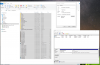
I have a Win10 installation that started at 64gb. I bumped the size to 96gb as my usage got close to 50gb and I suffered the "typical" expanding disk issue where the added space was unallocated. I merged the unallocated space into C:\ & Windows successfully reported that it had 96gb total. However, as I got closer to 64gb, my disk usage claimed nearly 100% utilization (even though I now had 96gb total). I just re-expanded my disk to 112gb. Windows now believes I have 112gb total, but only shows 16% free (17.54gb). If I view the properties of all files & folders on C:\, they total 62.6gb (55.5gb on disk). Looking at the PVM, it is only 67.54gb.
My question: how do I get Parallels to properly expand to the full 112gb on my Mac and/or convince Windows that it has more space than it realizes. I've run chkdsk & everything appears fine. The issue that I currently have is that I'm using 64g on a 112g allocation but my Windows thinks I only have 17gb free.
Help!
Thanks.

I realize there are a lot of threads about folks having various issues with their expanding disk, but I haven't had luck finding a topic that addresses my particular issue.
I have a Win10 installation that started at 64gb. I bumped the size to 96gb as my usage got close to 50gb and I suffered the "typical" expanding disk issue where the added space was unallocated. I merged the unallocated space into C:\ & Windows successfully reported that it had 96gb total. However, as I got closer to 64gb, my disk usage claimed nearly 100% utilization (even though I now had 96gb total). I just re-expanded my disk to 112gb. Windows now believes I have 112gb total, but only shows 16% free (17.54gb). If I view the properties of all files & folders on C:\, they total 62.6gb (55.5gb on disk). Looking at the PVM, it is only 67.54gb.
My question: how do I get Parallels to properly expand to the full 112gb on my Mac and/or convince Windows that it has more space than it realizes. I've run chkdsk & everything appears fine. The issue that I currently have is that I'm using 64g on a 112g allocation but my Windows thinks I only have 17gb free.
Help!
Thanks.
Last edited:
