Increased video memory support

How much VRAM does your physical graphics card support?


  • Total voters
    61

mkrisch

Bit poster
Recreating this post as my original one was removed because it also mentioned DirectX 11 support.

Currently, VRAM is restricted to 2GB. Video memory is important in gaming for support of higher resolution textures. For games like Skyrim and Fallout, the ability to increase VRAM (assuming sufficient host memory) to a minimum of 4GB improve the support for enhanced textures. Unless there's a technical reason to implement a maximum, why limit?

The comment made when the original post was removed mentioned the feature was tied to higher resolution support on Macs. Retina displays are pretty high resolution, and I'm typing this on a 5k iMac. But note that even with non-retina 2560x1600, games like those previously mentioned benefit from higher VRAM to support improved 2k textures.

This doesn't seem to require a new feature, so much as to remove the existing limitation of 2GB.
 
We certainly need support for gaming on Parallels which is lacking even on the pro edition 13 parallels upgrade. Hey !! are Parallels management sleeping we could just use bootcamp instead?
 
I was surprised to find this limitation. I recently purchased an iMac with the Radeon 580 with 8gb of video memory. I use parallels to run SolidWorks, and would certainly benefit from access to the additional vram.
 
Guys, emulation software do not use graphics card memory directly. It doesn't make sense how many video memory your Mac has. The memory for graphics is allocated inside main RAM.
 
Last edited:
I bought an iMac Pro with 10 cores and a Radeon Pro Vega 64 16GB VGA card that I would like to maximize the use of my Solidworks installation on windows 10 Parallels. Unfortunately I am not able to allocated more than 2GB for Graphics which I found very deceiving. I would like to be able to allocate up to 14GB to my Parallels Windows 10 instance. This is currently a product limitation.
 
This is very deceiving and I am not even getting back an official response that this company even tested an iMac Pro thoroughly on the device. Can you at least confirm that your VM's indeed run on an iMac Pro at least? Thanks so much.
 
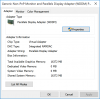
See attached snapshot. So deceiving. I bet a very easy software change from Parallels. I am not sure why they put those kind of limitations!!!
g-memory.png
 
JadH - All I can do is support the fact from my post above that the iMac Pro does indeed run VM's as I needed but I haven't have the need to increase the graphics to 2GB but with your issue and new AR and other 8K Raw - I am sure this would be welcome. alexg with parallels seems to indicate that it doesn't matter how much is on the card but they use RAM instead. Do you have enough RAM to support it as well? If so one would think you could increase it to your installed RAM. Good Luck and please respond parallels.
 
Guys, emulation software do not use graphics card memory directly. It doesn't make sense how many video memory your Mac has. The memory for graphics is allocated inside main RAM.

This is misleading. Then the graphics memory selection should be turned off and rely on the RAM. I hear you but that's not a good experience. Why not taking advantage of the VGA card RAM + the main memory RAM? I am a computer & communication engineer myself and worked with Intel and Microsoft for decades.

How hard is to change that drop down list to be able to take advantage of the full capacity of the graphics RAM?

I use solidworks with parallels on my iMac Pro because I am working on a 5K screen. there is no good 5k screen for PC on the market. I paid high dollar for the iMac Pro mainly to be able to increase my productivity on my SW VM. I would like to allocated 14gb from the VGA and 56gb for the RAM (I have 64gb). I work with Large Assemblies files that need this kind of power.

All my company is on Mac computers and we use iMessage and Apple email/products. I am not going for bootcamp just saying before someone suggests that.
 
Hi guys, this feature was implemented in Parallels Desktop 14 for Mac (see release notes).

The new "Auto" mode for graphics allows Windows 8 and later to use more than 2 GB of Mac system memory for graphics, while allowing Windows applications to use it when possible. To use this feature, you must update Parallels Tools first > shutdown the VM > go to Hardware > Graphics > set Memory to 'Auto' > since now Windows will use up to half of assigned system memory (RAM) for graphics needs. E.g. if Windows has 8GB of RAM, it will use up to 4GB for graphics if required.
 
However a question remains... Is Parallels using/accessing the VRAM from the Video Card of the Mac Hardware? or is it simply allocating whatever amount of "Graphics Memory" from the Memory setting on the "CPU & Memory"?
Please, a developer from Parallels to explain? And if Parallels is NOT using the VRAM from the Video Card on the Mac, please explain the reason as to why not?
Thanks.
 
However a question remains... Is Parallels using/accessing the VRAM from the Video Card of the Mac Hardware? or is it simply allocating whatever amount of "Graphics Memory" from the Memory setting on the "CPU & Memory"?
Please, a developer from Parallels to explain? And if Parallels is NOT using the VRAM from the Video Card on the Mac, please explain the reason as to why not?
Thanks.
UPDATED

Hi @Doupago,
About direct access to Mac vRAM, no, Mac applications do not have direct access to computer's vRAM. OpenGL and Metal manages allocations and virtualizes video memory for applications' use. Parallels Desktop uses OpenGL API to implement 3D acceleration.

About memory allocation. Yes Parallels Desktop allocates graphics memory from Mac system memory, except for a case when video memory is set to 'Auto'. In this case Windows itself allocates memory for graphics purposes from guest system RAM (which is allocated from Mac RAM), but not more than a half of assigned RAM.
So if you Mac video card has 3GB of vRAM, but your virtual machine has 4GB of System Memory (RAM) assigned, Windows will use only up to 2GB of video card's vRAM. To use all available on Mac vRAM, the amount of assigned RAM should be twice higher - 6GB in this case.
 
Last edited:
Back
Top