@Andrea43 Are you using Parallels RAS on your RDSH? If not, you will need change the connection type (from the connection's settings on your client) to Standard RDP. The Parallels Client for Android defaults new connections to RAS connections, which use port 443 by default.
Hello @jpc,
on my server I have not set anything, I have only enabled the ability to connect the user defined in RDP. With all other applications I can access without problems (on port 3389)
Thanks for the clarification.
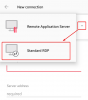
Parallels Client for Android supports two types of connections. The default one is for RAS. The other one is for Standard RDP (i.e. 3389).
Could you please try the following:
Remove the old connection
Create a new connection
Select Standard RDP (ref to image below)
Configure the connection: enter server name; port should already have been set to 3389