
Hi everyone!
When I connect my 4TB SSD to my Macbook M1 Max and use Windows 11 through Parallels the external SSD shows up under virtual network drives (Mac).
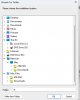
When I want to install a big database of files on the external SSD the installer gives an error because it cannot read any free space on the disk although there is plenty of free space on it (see screenshots).

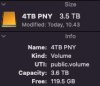
So how do I make Parallels see the eternal drive as a real hard disk in Windows so I can install software on it?
Hopefully it's clear, thanks!
When I connect my 4TB SSD to my Macbook M1 Max and use Windows 11 through Parallels the external SSD shows up under virtual network drives (Mac).
When I want to install a big database of files on the external SSD the installer gives an error because it cannot read any free space on the disk although there is plenty of free space on it (see screenshots).
So how do I make Parallels see the eternal drive as a real hard disk in Windows so I can install software on it?
Hopefully it's clear, thanks!