Here's the situation...
I had Parallels Desktop 3.0 installed on Tiger. Installed Leopard and then had trouble with Parallels after that. I read that you should uninstall Parallels and then reinstall it (build 5160). I am currently at the point of installing but everytime I go to install it it freezes on me.
When I go to close the installer it says that I cannot because it is 'busy'.
It will not close unless I Force Quit it.
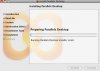
Attached is a picture of the install window.
Please help.
Thanks
I had Parallels Desktop 3.0 installed on Tiger. Installed Leopard and then had trouble with Parallels after that. I read that you should uninstall Parallels and then reinstall it (build 5160). I am currently at the point of installing but everytime I go to install it it freezes on me.
When I go to close the installer it says that I cannot because it is 'busy'.
It will not close unless I Force Quit it.
Attached is a picture of the install window.
Please help.
Thanks