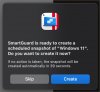
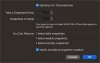
I have SmartGuard snapshots enabled and set to notify me before snapshot creation. This provides a popup where I can confirm that I want to create a snapshot or skip it. If I take no action in the popup prompt, a snapshot is created after a 60 second countdown.
Often I am in the middle of a task that I don't want to interrupt and it won't make sense to create a snapshot in the current VM state. If I skip creation of the snapshot I don't get a SmartGuard snapshot created for the day at all and the only way I can get a snapshot for the day is by creating one manually, but then I need to manually remove it later.
What I would like in a Snooze button added to the SmartGuard popup that would dismiss the popup for 5 minutes and then it would popup again to ask if a SmartGuard snapshot should be created now. This would allow me to delay the creation of the SmartGuard snapshot for a short while, but still get the option of creating one for the day instead of forgoing the snapshot for the day or having to manage creation/deletion of a manual snapshot.
Thanks.
Often I am in the middle of a task that I don't want to interrupt and it won't make sense to create a snapshot in the current VM state. If I skip creation of the snapshot I don't get a SmartGuard snapshot created for the day at all and the only way I can get a snapshot for the day is by creating one manually, but then I need to manually remove it later.
What I would like in a Snooze button added to the SmartGuard popup that would dismiss the popup for 5 minutes and then it would popup again to ask if a SmartGuard snapshot should be created now. This would allow me to delay the creation of the SmartGuard snapshot for a short while, but still get the option of creating one for the day instead of forgoing the snapshot for the day or having to manage creation/deletion of a manual snapshot.
Thanks.