
If I leave the "USB debugging" option active on my android device the Windows 11 guest keeps connecting and disconnecting in a loop.
Other problems also occur, such as:
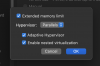
- I can't run Docker (doesn't start / Hyper-V enabled / WSL 2 installed)
- I can't connect an Xbox Controller (The device only appears as paired and not connected)
- I can't run an android emulator on guest windows
All problems do not occur on the host.
-
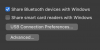
Other problems also occur, such as:
- I can't run Docker (doesn't start / Hyper-V enabled / WSL 2 installed)
- I can't connect an Xbox Controller (The device only appears as paired and not connected)
- I can't run an android emulator on guest windows
All problems do not occur on the host.
-