zhollifield
Bit poster
Hi everyone,
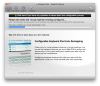
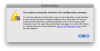
I've got Vista 64 installed on my mac. I installed as a standard virtual machine just like they say to install. BUT I also have Vista 64 installed on a separate internal drive that I use to bootup with bootcamp. When I configure the virtual machine I have already to boot up with my bootcamp partition I get this awfully dreaded long configuration saying "Please wait while the Virtual Machine is being Configured". It takes about 10 minutes to configure then I get this error message saying "You need to manually continue the configuration process". I hit OK and it opens my windows bootcamp partition. But windows runs incredibly slow and none of my mouse clicks are accurate, its basically unusable when booted via BOOTCAMP partition. Plus I cant use coherence like I could with the standard virtual machine I have on my Mac OS X drive.
Any ideas how to solve this 1) skipping the 10 minute long "Virtual Machine Configuration"... 2) Making it actually usable with my bootcamp partitioned drive... 3) Using coherence with bootcamp?
I attached my windows with the prompted text.
Anything would help.
Thanks in advance!
-Zach
I've got Vista 64 installed on my mac. I installed as a standard virtual machine just like they say to install. BUT I also have Vista 64 installed on a separate internal drive that I use to bootup with bootcamp. When I configure the virtual machine I have already to boot up with my bootcamp partition I get this awfully dreaded long configuration saying "Please wait while the Virtual Machine is being Configured". It takes about 10 minutes to configure then I get this error message saying "You need to manually continue the configuration process". I hit OK and it opens my windows bootcamp partition. But windows runs incredibly slow and none of my mouse clicks are accurate, its basically unusable when booted via BOOTCAMP partition. Plus I cant use coherence like I could with the standard virtual machine I have on my Mac OS X drive.
Any ideas how to solve this 1) skipping the 10 minute long "Virtual Machine Configuration"... 2) Making it actually usable with my bootcamp partitioned drive... 3) Using coherence with bootcamp?
I attached my windows with the prompted text.
Anything would help.
Thanks in advance!
-Zach