BitLocker Disk Encryption for Windows 11 ARM in Parallels Desktop 17 (M1)

rekeno

Bit poster
Hi,

Just got my Mac Studio (M1 Max), and installed Parallels Desktop 17. Created a new Windows 11 ARM VM, and tried to enable BitLocker inside the Windows for C: Drive. The encryption never got started, please see attached screenshot. Tried to restart the computer didn't help.

Does PD 17 for Mac M1 support Bitlocker at all?

Thanks
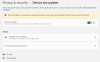
 

Attachments

  • Screenshot 2022-04-12 at 5.34.50 PM.png
    Screenshot 2022-04-12 at 5.34.50 PM.png
    106.8 KB · Views: 115
Hello @rekeno, Please follow the steps mentioned below to enable the BitLocker.
1. Press Windows key + R to invoke the Run dialog.
2. In the Run dialog box, type tpm. MSC and hit Enter to open TPM Management snap-in.
3. In the right pane, under Actions, click on Clear TPM.
4. Exit TPM Management snap-in.
5. Restart PC.
 
I have a related but slightly different problem:
I have a bitlocker encrypted volume VHDX that i keep on my home folder in macos (on macbook air m1).
Said folder appears in my Parallels Windows 11 (arm64) but will always give an error on trying to unlock it.
But if I copy it to the C drive in parallels 18 - windows 11 OR if i copy it to external USB drive then it will unlock properly.

FYI, the macos home folder is shared / appears in Win11 by network share (configured by parallels)
So, essentially bitlocker is not unlocking when the encrypted VHDX is on a network share.

Any insights to solve this would be appreciated.
 
Back
Top