1. Mac OS Version - 10.5.2
2. Parallels Build # - 5160
3. What kind of computer - Mac Pro Dual 2.66 GHZ
4. Total Physical RAM - 2GB
5. Hard Drives - 250GB
6. If you are using a BootCamp configuration or not - ?? Not Sure. Windows XP
7. Did you upgrade from a BETA - NO
8. With what Build did the problem start - Installed today
9. If Parallels Tools are installed - Yes
10. Anything you have tried to get things working - Installed Monitor Driver on PC
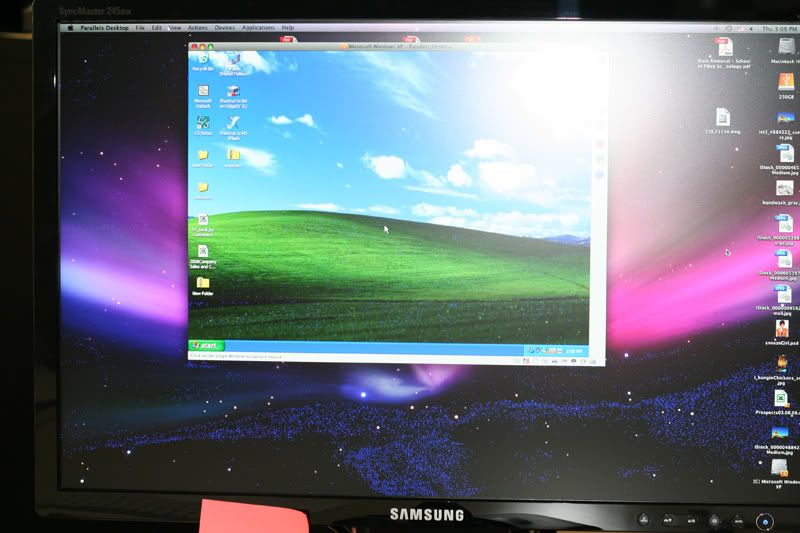
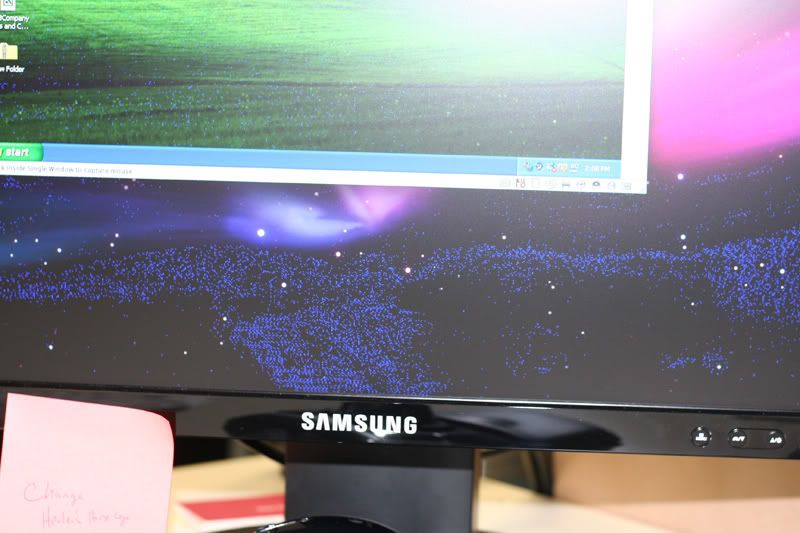
11. Anything specific about your set-up you think we should know - Blue Lines Flickering in dark areas
12. If you are crashing, upload some crash logs - NO Crashing
13. If you are getting an error message type it in and then attach a screenshot. - NO
14. If you are having issues with a specific component (i.e. mouse, keyboard, monitor) tell us what it is.
Here is the Issue::
I installed today, and this problem occurred directly after install on the Mac.
In dark areas of an image, I am getting a digital flicker, like "dancing ants" that are Blue.
This is occurring on a Samsung SynMaster 245BW monitor, connected via DVI cable.
I would take a screenshot, but I do not think it would help.
I have noticed it in InDesign, PhotoShop, and to be sure it wasn't just CS, iPhoto and FrontRow.
Any Ideas??? Perhaps I will take a digital photo or video that hopefully you will be able to see. I just installed a few hours ago, so I am not that familiar with the program.
thanks-
Eric
2. Parallels Build # - 5160
3. What kind of computer - Mac Pro Dual 2.66 GHZ
4. Total Physical RAM - 2GB
5. Hard Drives - 250GB
6. If you are using a BootCamp configuration or not - ?? Not Sure. Windows XP
7. Did you upgrade from a BETA - NO
8. With what Build did the problem start - Installed today
9. If Parallels Tools are installed - Yes
10. Anything you have tried to get things working - Installed Monitor Driver on PC
11. Anything specific about your set-up you think we should know - Blue Lines Flickering in dark areas
12. If you are crashing, upload some crash logs - NO Crashing
13. If you are getting an error message type it in and then attach a screenshot. - NO
14. If you are having issues with a specific component (i.e. mouse, keyboard, monitor) tell us what it is.
Here is the Issue::
I installed today, and this problem occurred directly after install on the Mac.
In dark areas of an image, I am getting a digital flicker, like "dancing ants" that are Blue.
This is occurring on a Samsung SynMaster 245BW monitor, connected via DVI cable.
I would take a screenshot, but I do not think it would help.
I have noticed it in InDesign, PhotoShop, and to be sure it wasn't just CS, iPhoto and FrontRow.
Any Ideas??? Perhaps I will take a digital photo or video that hopefully you will be able to see. I just installed a few hours ago, so I am not that familiar with the program.
thanks-
Eric