Hi everybody!
Could you give me some advice on the following issue?
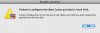
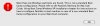
Once when I started a virtual machine with WinXP based on my bootcamp I got a message that the harddrive could not be found. I ve tried deleting the VM, but after that when I manually create a new VM from bootcamp I am getting the following error message (attached PD4 9168) Tried installing PD3 but it shows an other error for bootcamp (attached PD3 5608). I dont remember installing new software to either WinXP or MacOS; or doing any serious changes to the system before it went wrong. Maybe only some automatic security updates in windows.
Is there a way of making windows run again in any version of PD without reinstalling the OS?
Thanks.
MacBook Pro 4.1
MacOS 10.5.5
WinXP Corporate Edition SP3
Parallels Desktop 4.0 9168
Parallels Desktop 3.0 5608
Could you give me some advice on the following issue?
Once when I started a virtual machine with WinXP based on my bootcamp I got a message that the harddrive could not be found. I ve tried deleting the VM, but after that when I manually create a new VM from bootcamp I am getting the following error message (attached PD4 9168) Tried installing PD3 but it shows an other error for bootcamp (attached PD3 5608). I dont remember installing new software to either WinXP or MacOS; or doing any serious changes to the system before it went wrong. Maybe only some automatic security updates in windows.
Is there a way of making windows run again in any version of PD without reinstalling the OS?
Thanks.
MacBook Pro 4.1
MacOS 10.5.5
WinXP Corporate Edition SP3
Parallels Desktop 4.0 9168
Parallels Desktop 3.0 5608