I'm testing PII 5 and VMWare Fusion 3 downloadable trials. Haven't made my mind up which to get.
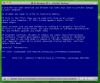
I'm having a major problem migrating my XP Pro SP3 on Dell hardare installation to PII 5. The conversion seems to go ok but when the VM tries to start, I get the blue screen error "NDIS.sys - Address F75BCC34 Base at F7597000, DateStamp 48025d03" (Screen shot attached below).
I thought at first it was an old, disabled wireless card in the pc so I uninstalled all the drivers and the card and tried again with no luck.
On the PII 5 side, I tried all sorts of things suggested in other forums for other BSOD errors (I couldn't find my error at all). I tried just about every option on the HW configuration tab:
- all the network card options, connected and disconnected
- starting the vm with the cd not attached
- eliminating all the possible boot sources save the HD
- reducing the memory on the vm and the video adapter, increasing the same
- changing the and location address of the hd.
I've run out of options.
I was able to migrate W7 from hardware and XP Pro from a laptop without any bother. They run perfectly.
VMWare Fusion 3 had no trouble migrating the Dell at all, in fact, I'm writing to you from it now.
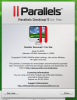
The version of PII 5 is in the 2nd screenshot.
The Mac hardware is a new 27in, quad core i5 with 8GB ram and 1TB HD
I've spent the first week of my two week PII 5 trial struggling with this. It would be really nice to be able to get down to some real testing.
An NDIS.sys error should be something related to the network card or drivers but I just can't figure it out.
Thanks a lot in advance.
Russel
I'm having a major problem migrating my XP Pro SP3 on Dell hardare installation to PII 5. The conversion seems to go ok but when the VM tries to start, I get the blue screen error "NDIS.sys - Address F75BCC34 Base at F7597000, DateStamp 48025d03" (Screen shot attached below).
I thought at first it was an old, disabled wireless card in the pc so I uninstalled all the drivers and the card and tried again with no luck.
On the PII 5 side, I tried all sorts of things suggested in other forums for other BSOD errors (I couldn't find my error at all). I tried just about every option on the HW configuration tab:
- all the network card options, connected and disconnected
- starting the vm with the cd not attached
- eliminating all the possible boot sources save the HD
- reducing the memory on the vm and the video adapter, increasing the same
- changing the and location address of the hd.
I've run out of options.
I was able to migrate W7 from hardware and XP Pro from a laptop without any bother. They run perfectly.
VMWare Fusion 3 had no trouble migrating the Dell at all, in fact, I'm writing to you from it now.
The version of PII 5 is in the 2nd screenshot.
The Mac hardware is a new 27in, quad core i5 with 8GB ram and 1TB HD
I've spent the first week of my two week PII 5 trial struggling with this. It would be really nice to be able to get down to some real testing.
An NDIS.sys error should be something related to the network card or drivers but I just can't figure it out.
Thanks a lot in advance.
Russel