BSOD memory error

farberm

Bit poster
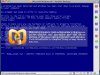
I am receiving a BSOD when booting that states an attempt was made to write to read-only memory.

Technical Info::

STOP: 0x000000BE (0xB9778000, 0xBA2DE900, 0x000000B)
dump_atapi.sys - Address B9778000 base at B9777000, DateStamp 000000

Any way to fix this without reinastalling windows?

I am using a 8 core Mac pro with build 5188 of Parallels.
 
I am using Leopard on a MacBook Pro with build 5160. It was working fine, but now Parallels won't work at all. I can boot into safemode and I can boot into Windows using Boot Camp. Anyone have any ideas?

I have the same error. My reads:
"A problem has been detected and windows has been shut down to prevent damage to your computer.

An attempt was made to write to read-only memory.

Technical Information:
STOP: 0x000000BE (0xF6B4A000,0x093DC121, 0xF769C900, 0X0000000B)

dump_atapi.sys - Address F6B4A000 base at F6B49000, DateStamp 0000000"
 

Attachments

  • Parallels Error.jpg
    Parallels Error.jpg
    117.4 KB · Views: 6
Hello,

was there any major changes in Windows or on your Mac? Have you installed any new devices?

Best regards,
Stacey
 
Stacy,

Thanks for the reply. I didn't install any new hardware. When it was working ok, I was getting the Parallels unable to allocate VM memory error and if I restarted the machine, occasionally I could get it to work. I also tried playing with the memory settings but it didn't seem to help. It may have been after that that I got the BDOD.

I also swear that after I got the BSOD, I checked the build I was using and it said 5162. I can't find 5162 again, so I tried reinstalling 5160. It didn't help.
 
Could you please provide me with two screenshots?
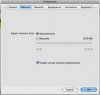
1. 'Parallels Desktop' -> 'Preferences' -> 'Memory' tab.
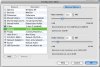
2. 'Configuration Editor' -> 'Memory' tab.

Build 5162 is unofficial build and it is not update. It is provided only for customers with particular issues.

Also please try to do the following:
1. Open your Boot Camp virtual machine.
2. Open Configuration Editor
3. In the Resource list, click Hard Disk.
4. In the hard disk settings pane, click the Advanced tab.
5. In the Cleanup Boot Camp Partition area, click the Clear button.

Then please try to create a new VM using your Boot Camp partition.

Best regards,
Stacey
 
I have had these at different settings, but here's where they are now. I had the pref one set to manual before.

Am I going into Bootcamp through OSX?
 

Attachments

  • Pref Mem.jpg
    Pref Mem.jpg
    7.3 KB · Views: 9
  • Mem Tab.jpg
    Mem Tab.jpg
    22.9 KB · Views: 8
Please disable virtual memory preallocation.
Also please try to decrease the amount of Main memory in Configuration Editor.

No, you should start Parallels Desktop and choose your Boot Camp VM.

Best regards,
Stacey
 
I am having the exact same issue. I think I got it to boot once or twice after installing Leopard, but now it won't boot at all, same memory error before the login screen. I've tried both build 5160 and the new beta build. Ideas?
 
Maybe this will help. - See below for the email I received from technical support regarding this error. I haven't tried it yet though. I'll give it a go this weekend.

"Hello,

Please first backup your Windows installation. It is in your Home folder
- Documents - Parallels - Windows folder.

After you make a backup please open your Home folder - Documents -
Parallels - Windows folder. Push command key, double-click .pvs file and
don't release command key for 15-20 seconds till you get Parallels
configuration window.

Click on Configuration. Open Booting tab and change boot sequence to
boot from CD first.

1. Insert Windows installation CD into the Mac.
2. Start your virtual machine and click into the Parallels window.
3. When the Press any key to boot from CD message is displayed on your
screen, click inside the screen and press any key to start your computer
from the Windows XP CD.
4. Press ENTER when you see the message To setup Windows XP now, and
then press ENTER displayed on the Welcome to Setup screen.
5. Do not choose the option to press R to use the Recovery Console.
6. In the Windows XP Licensing Agreement, press F8 to agree to the
license agreement.
7. Make sure that your current installation of Windows XP is selected in
the box, and then press R to repair Windows XP.
8. Follow the instructions on the screen to complete Setup.

Please let us know if the repair was successful and the data is safe.

---
Best regards,
Kate
Parallels Customer Service"
 
Last edited:
Well, I tried changing some settings and it booted all of a sudden. I changed memory size from 728 MB to 512 (the system has 3 GB of RAM installed) and changed video memory from 12 MB to 16 MB (I have a 512 MB ATI card).
 
Hmm, that's what I had put mine to as well, but that didn't work. Since that error first showed up, it has consistently appeared every time. I can still be fully functional in Windows through Boot Camp though.
 
I think I also tried not having it attach the cd-rom drive at boot as well. Maybe see if that works? I, too, never had problems booting into Boot Camp, only when trying to run Parallels, now all seems to be working fine having just messed with a few options (still a bug though).
 
Hello,

synchronicity,
did you disable virtual memory preallocation?
Did you try to reboot your Mac?

Best regards,
Stacey
 
Same

I experienced the same thing, I tried all sorts of regedits and other things to fix it, nothing. What finally did it for me was to adjust the virtual machine settings, including the memory, video memory, performance for OS X apps vs Windows, and CD Drive (including disabling it) I don't know what finally made it work but it does!!! no more BSOD with error 00BE
 
I'm having the exact same problem. My issue started when I changed the Video Memory. It was originally set to 8MB, but I bumped it up to 12MB. Apparently, this memory configuration causes the dump_atapi.sys bug check. I A/B tested many other configurations but the only one that had an effect was the 12MB setting. I think this information might be highly valuable to your devs. Good luck hunting this one down!
 
Back
Top