BSOD on 3170 - How to capture screen?

edwardd20

Member
I was running 3150 yesterday from a boot camp partition. I upgraded to 3170. The upgrade seemed to go smooth. I was running in parallels and windows XP Pro asked me to download a whole bunch of updates again (I thought I was current as of Thursday). I installed all of the updates, then booted into boot camp mode for an evening of game playing. This morning when I tried to start Parallels, I get a quick start, then a BSOD then an immediate reboot. It's basically an infinite loop. Sure I can get out by pressing Escape to halt the auto boot but I have to stop Parallels to prevent the cycle.

I've tried all of the various Safe modes. I've tried to recover from a previous checkpoint.

I tried to delete the partition from Parallels and re-create it new. No luck.

I un-installed 3170 then re-installed 3150 and re-tried to start my partition. No luck.

I can still boot into Boot Camp mode fine.

I tried to remove the Parallels Tools while in boot camp but it tells me I must be in VM mode to so that.

So I'm asking for help on two fronts. 1) How can I halt and capture the BSOD so I can present the screen for somebody to debug it? 2) How can I get back to being operational under Parallels boot camp partition again?

Oh, my machine is a MBP, 2.33 with 2G and 256M X1600 graphics.
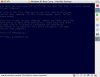
 
I can add a little more to my saga. I manged to get a partial snap shot. The attached image is dimmed because I managed to pause the machine to capture it.
 

Attachments

  • BSOD_1.jpg
    BSOD_1.jpg
    72.3 KB · Views: 25
Here is a better screen capture.

Can somebody tell me how to completely remove Parallels so I can re-install from scratch? I tried to uninstall but it isn't asking me for my serial number again so I'm missing something.
 

Attachments

  • Parallels.jpg
    Parallels.jpg
    90.5 KB · Views: 15
This was copy/pasted from MSDN help:

The Stop 0x7B message indicates that Windows XP has lost access to the system partition or boot volume during the startup process. Installing incorrect device drivers when installing or upgrading storage adapter hardware typically causes stop 0x7B errors. Stop 0x7B errors could also indicate possible virus infection.

The second parameter is very important because it can indicate whether the 0x7B Stop message was caused by file system issues or problems with storage hardware and drivers. Values of 0xC000034 or 0xC000000E typically indicate:

* Disks or storage controllers that are failing, defective, or improperly configured.
* Storage-related drivers or programs (tape management software, for example) that are not fully compatible with Windows XP Professional.

Possible Resolutions:

* During I/O system initialization, the controller or driver for the startup device (typically the hard disk) might have failed to initialize the necessary hardware. File system initialization might have failed because of disk or controller failure, or because the file system did not recognize the data on the boot device.
* Repartitioning disks, adding new disks, or upgrading to a new disk controller might cause the information in the Boot.ini file, or Boot Manager, to become outdated. If this Stop message occurs after installing new disks to your system, edit the Boot.ini file or adjust the Boot Manager parameters to allow the system to start. If the error occurs after upgrading the disk controller, verify that the new hardware is functioning and correctly configured.
* Verify that the system firmware and disk controller BIOS settings are correct and that the storage device was properly installed. If you are unsure, consult your computer's documentation about restoring default firmware settings or configuring your system to auto-detect settings. If the error occurs during Windows XP Professional setup, the problem might be due to unsupported disk controller hardware. In some cases, drivers for new hardware are not in the Windows XP Professional Driver.cab library, and you need to provide additional drivers to complete the Windows XP setup successfully. If this is the case, follow the hardware manufacturer's instructions when installing drivers. Periodically check for driver and firmware updates.
* Hard disk corruption can also cause this Stop message. For more information about checking hard disk integrity, see the instructions provided in "Stop 0x00000024 or NTFS_FILE_SYSTEM" earlier in this list.
* Problems that cause 0x7B errors might also cause Stop 0xED errors. For more information about 0xED Stop messages, see "Stop 0x0000007B or INACCESSIBLE_BOOT_DEVICE" later in this list.

I would guess that something messed up the partition table on your disc. Grab a copy of partition magic or something similar and see what you can do...
 
I understand the veribage of what was said, but won't the I/O controller be Parallels? As I said initially, I can still boot via Boot Camp fine.

What I didn't say before was that my partition is FAT32 if that matters.
I also didn't explicitly say that Parallels is accessing a boot camp partition.

I'll try to get a copy of Partition Magic to see if that tells me anything. On that same line, how about a Norton Disk Doctor or something of that nature?

Thanks,

Ed
 
Last edited:
I realize this is community forum but I'm dis-appointed that it's been a week with no solution. I still can't use Parallels.

I submitted a normal bug report, a beta bug report and posted here.

:(

Ed
 
Interesting. I sent an email to sales@ asking if I did a paid telphone call to support, would they be able to provide a response. No response from the sales either.
 
I just saw the same error today ...

I copied an old disk image (with duplicate in Finder) and renamed it to have the right name. Windows didn't start anymore and I came into the same loop with the same error message (and the same problems to catch the screen of the VM). After spending a lot of time with testing different things I just copied the image a second time ...... and Windows started again.

I've absolutely no idea why it worked again or why it didn't work before.

Anyway, this probably doesn't help you too much ....
 
Back
Top