I'm running a Windows 8.1 VM with Parallels 10 on a MacBook Pro with Retina display. My Windows programs are being displayed with way too high screen resolution. I referred to http://kb.parallels.com/en/119926 which tells me to Adjust the Windows virtual machine's configuration settings -> Hardware > Video > and just uncheck Enable Retina resolution option
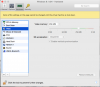
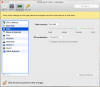
My problem: there is no such option on the menu that displays when I select -> Hardware > Video. Instead, my menu looks like the one in the attached screen shot. So that KB article is not very helpful.
How do I fix this?
My problem: there is no such option on the menu that displays when I select -> Hardware > Video. Instead, my menu looks like the one in the attached screen shot. So that KB article is not very helpful.
How do I fix this?