
Install the app
How to install the app on iOS
Follow along with the video below to see how to install our site as a web app on your home screen.
Note: This feature may not be available in some browsers.
You are using an out of date browser. It may not display this or other websites correctly.
You should upgrade or use an alternative browser.
You should upgrade or use an alternative browser.
Cannot create High Sierra VM
- Thread starter Lee4
- Start date
Arun@Parallels
Parallels Support
DonMontalvoCA
Member
Well, to be fair, Parallels did publish a blog saying it is possible.
Was this just a marketing thing, did it not ever work?
We know it isn't supported, but if it is at all possible...well...
http://blog.parallels.com/2017/06/08/high-sierra-beta-in-parallels-desktop/

Was this just a marketing thing, did it not ever work?
We know it isn't supported, but if it is at all possible...well...
http://blog.parallels.com/2017/06/08/high-sierra-beta-in-parallels-desktop/
Hello DonMontalvoCA,
If you have read the blog, it is clearly mentioned that High Sierra VM was not created directly instead a macOS X Sierra VM was upgraded to High Sierra. You can also try the same and check. Also at the end of the blog, it is clearly mentioned Parallels doesn't officially support the Developer Preview of High Sierra. You can try the same steps in the blog and share the results with us.
If you have read the blog, it is clearly mentioned that High Sierra VM was not created directly instead a macOS X Sierra VM was upgraded to High Sierra. You can also try the same and check. Also at the end of the blog, it is clearly mentioned Parallels doesn't officially support the Developer Preview of High Sierra. You can try the same steps in the blog and share the results with us.
DonMontalvoCA
Member
If you have read the blog
Yes, of course, that's why the blog was mentioned. 
The blog follows the same route as previous Beta releases, expect in this case disabling the new file format.
This process does not work for us, starting with 10.12.6 (fully updated) new macOS VM, Parallels 12.2.1, and the latest Beta builds (tried 5 and 6).
Yes, we are downloading the Developer Seed installer from within the VM (not copied over), and yes High Sierra is downloading on the VM (not copied over).
Beginning with Beta 5, we no longer see the option to disable the new file format.
Has the process in the blog been vetted on Beta 5 or 6?
PS, before you say "Not supported'...we already know that, just asking because the blog exists and does not appear to work.
Thanks,
Don
DonMontalvoCA
Member
@Lee4 thanks for confirming.
No prompt as of Beta 5/6, so installer fails after trying to reboot into the temporary install partition, because it can't validate drive:
http://donmontalvo.com/parallels/12/parallelsDesktop12business_nogo.png
No prompt as of Beta 5/6, so installer fails after trying to reboot into the temporary install partition, because it can't validate drive:
http://donmontalvo.com/parallels/12/parallelsDesktop12business_nogo.png
DonMontalvoCA
Member
Installed High Sierra Beta 6 on a LAB computer, confirmed no checkbox, and confirmed APFS format is forced.
Arun@Parallels
Parallels Support
Hi @BFranks , Parallels Desktop 12 for Mac is not officially supported to work with high sierra. We are working on it . Please subscribe to our newsletter to get notified by our updates.
Amazin, every year this happens to me too! I pay for my Parallels evey yeat too like a good customer. But yet Parallels can never seem to be ahead of the game. They always blame Apple. Why not let us developers opt in on a beta parallels that can run it. It make is very frustraing when myslf, a paying customer and developer is stuck waiting for the finger pointing game to end. Why cannot there be a proactive approach to this for the ones who wish?
Hi forum,
I have installed MacOS High Sierra GM on my MacBook Pro late 2016 and Parallels 13.0.1 (42947). When I choose new VM, the option for installing MacOS is not there. Older version of both Parallels (version 13) and MacOS High Sierra beta's were not able to install the VM, but the option were there.
Anyone?
I have installed MacOS High Sierra GM on my MacBook Pro late 2016 and Parallels 13.0.1 (42947). When I choose new VM, the option for installing MacOS is not there. Older version of both Parallels (version 13) and MacOS High Sierra beta's were not able to install the VM, but the option were there.
Anyone?
Looks like 13.1.0 (43108) build have fixed the issue, but introduced new once ... Now the installer runs for a while and than shows an alert that High Sierra is not possible to install on this computer.Hi forum,
I have installed MacOS High Sierra GM on my MacBook Pro late 2016 and Parallels 13.0.1 (42947). When I choose new VM, the option for installing MacOS is not there. Older version of both Parallels (version 13) and MacOS High Sierra beta's were not able to install the VM, but the option were there.
Anyone?
I've also tried installing VMware Fusion, as its new build also states to supporting to install macOS High Sierra from recovery partition. Looks like both VMware and Parallels struggle with the same issues, whereas VMware doesn't find a recovery partition during install ...
Last edited:
Mac Pro
10.13.2 macOS High Sierra
SSD 1TB Apple HD
I have installed Parallels Desktop
Version 13.2.0 (43213) three or four times. It wants 2TB of space for Windows 7.
Seem to keep finding the same suggestions:
1) Upgrade to latest version √
2) Reinstall √
3) Read the KB √
4) Resize the configuration √ not possible check the files system for errors
I did upgrade Parallels after upgrading from Sierra to High Sierra.
Any help would be appreciated. Have a lot of time invested already.
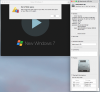
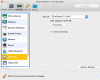
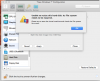
10.13.2 macOS High Sierra
SSD 1TB Apple HD
I have installed Parallels Desktop
Version 13.2.0 (43213) three or four times. It wants 2TB of space for Windows 7.
Seem to keep finding the same suggestions:
1) Upgrade to latest version √
2) Reinstall √
3) Read the KB √
4) Resize the configuration √ not possible check the files system for errors
I did upgrade Parallels after upgrading from Sierra to High Sierra.
Any help would be appreciated. Have a lot of time invested already.
Alfena@Parallels
Pro
Hello @R.D1 , please try the steps provided at http://kb.parallels.com/122872 and check if it works.
Thanks
Thanks
Seems that the Windows 7 VM I have been using for years is lost forever because it won't even boot into the operating system to repair the "file system" as mentioned in the error message...
Created a new Windows 10 VM.
Seems to be working fine.
Boots up, parallels tools is installing now...
Now the slog of reinstalling all the applications.
Thanks for the quick reply, but I had already read the KBs and they failed to help me with my problem.
Created a new Windows 10 VM.
Seems to be working fine.
Boots up, parallels tools is installing now...
Now the slog of reinstalling all the applications.
Thanks for the quick reply, but I had already read the KBs and they failed to help me with my problem.
Alfena@Parallels
Pro