Cannot install Ubuntu 8.04.1 LTS

etrigan63

Bit poster
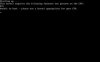
Went through the setup wizard to create an Ubuntu Server (8.04.1) on my Mac Pro (OS X 10.5.4) and I got the following error when I booted the VM for the first time (see attached screenshot):

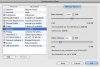
Was there something I did wrong? I have also attached a screenshot of the settings.

Carlos
 

Attachments
  • Parallels Picture.jpg
    Parallels Picture.jpg
    6 KB · Views: 14
  • ubuntu vm settings.jpg
    ubuntu vm settings.jpg
    21.4 KB · Views: 9
Last edited:
Default kernel. Just hit enter when the Ubuntu screen came up. What should I use? This is the server version of Ubuntu which has no GUI. I haven't found a wealth of info regarding the tricks to installing this.

For the record, I have tried this with the noapic and noacpi keys and still get the error shown in the first post. How do I install the system with the linux-virtual kernel if I can't get the silly thing to boot in the first place? All of the instructions I've seen deal with a bootable system.
 
Last edited:
BTW, there is a bug in the wizard when selecting an ISO file as a CD-ROM. The dialog box comes up but the wizard takes focus away and does not allow you to select an ISO file. The only way I can select an ISO file is to deselect the "boot <vm name>" option at the end and then specify the ISO image in the configuration screen.
 
OK, solved it myself.

Here's how:
  1. Create Ubuntu VM using wizard.
  2. In More Options, uncheck Start Ubuntu Linux.
  3. Before starting the VM, set boot order to CDROM - Hard Drive - Floppy.
  4. Install Ubuntu using whatever features you want.
  5. After Ubuntu reboots, load Rescue Mode from install CD (or image).
  6. Launch a Command Shell from /dev/sda1
  7. Type apt-get install linux-virtual
  8. Type exit
  9. Reboot your VM

It should come up normally now.
[*]
 
/dev/sda1 Not found

Hi I tried your workaround for getting Ubuntu 8.0.4.1 LTS Server to install on my copy of Parallels Desktop but I ran into the following error when I booted into the Rescue Disk step and tried to get a command prompt:

No usable shell was found on your root file system(/dev/sda1)

This error was in a giant red screen that said "No shell found in /target" above the error. I am very new to Linux so I am not sure what I did that could have caused the error. The only additional software I installed during the OS install process was the LAMP package.

Thanks for any help you can give
 
Is is possible to get two iso files that do not have checksums? I have downloaded from two different mirrors and neither has had a checksum that Disk Utility could identify.
 
Back
Top