Follow along with the video below to see how to install our site as a web app on your home screen.
Note: This feature may not be available in some browsers.
Hello,Hi, I've installed the Windows 10 on my Macbook. When I open it, it doesn't show the full screen icon.![]()
My screen looks like below with the "Installation Assistant" still on the title. Does that mean the installation isn't complete? What should I do now?
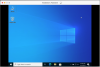
View attachment 21545
Any suggestions are appreciated. Thanks!

Thank you for the reply, but below is my window, seems like it's still in installation stage.Hello Liming,
Thank you for your feedback.
Open your virtual machine in Windowed mode. It should be as the screenshot
View attachment 21572
I read that instruction but in 3rd step i didn't get KB 115835. I am quite newbie into this can you help me out. ThanksI was able to solve the problem by following this blog: https://kb.parallels.com/en/124817
Hi, I just clicked on "Continue Manually..." under "Installation", then it enters full screen mode. Not sure if it's the standard way to solve the issue, but it works for me.I read that instruction but in 3rd step i didn't get KB 115835. I am quite newbie into this can you help me out. Thanks