Can't access Microsoft-related website / Windows Live Messenger / Windows Update

MichaelBook

Junior Member
Hello everyone,
English is not my mother tongue so may not be exactly correct, sorry about that.

I use Parallels Desktop 4.0 Build 4.0.3844 on my MacBook (running Mac OS X Leopard 10.5.7) to use the virtual machine with 'Windows XP Professional SP3' which is located on my Boot Camp partition.

In Boot Camp, I can access those Microsoft-related websites / Windows Live Messenger / Windows Update without difficulty.
But, when I use Parallels Desktop to access to my Boot Camp partition, the guest OS (Win. XP Pro. SP3) just cannot access those Microsoft-related websites / Windows Live Messenger/ Windows Update.
Except the Microsoft-related websites / Windows Live Messenger/ Windows Update, I can access any website I want to go, such as Google, Yahoo!, etc.

I try to Google the problem myself, but those methods just do not work for me.
Some says that it can be solved by selecting the 'Bridged Ethernet', but it just does not work.
(HERE: http://forum.parallels.com/showthread.php?t=18457)
(I use ADSL Broadband service with dynamic IP address)
The way I can use to access the Internet in my virtual machine is to use 'Shared Networking' OR 'Bridged Ethernet' (in 'Parallels Shared Networking Adapter',
but the crux is that I cannot access those Microsoft-related websites / Windows Live Messenger / Windows Update

I did not change anything in both the guest OS (Win. XP Pro. SP3) OR Parallels Desktop Preferences.
I just use the default settings, I did not assign any IP address, change anything... because I am not a veteran.
Please do me a favour as soon as possible, because I need to contact my friends when I am using the Mac OS X.
Thanks!

Example:
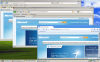
cannotsignintowindowsli.png
 
Update:
When I downgrade to Internet Explorer 6 (inside Boot Camp),
and boot to the Boot Camp Partition again through Parallels Desktop 4,
Windows Update is OK, but a little bit slow.
BUT I still can't access Microsoft-related Website / Windows Live Messenger.

Please help me, thanks in advance!
 
Update:
There are no pop-up warning messages for my problems.
But from the screenshots or what I will mention below, you know there are some problems about it.

Some updated information about my VM configuration (chronological):
(1) I removed Parallels Desktop 4 by using this method: http://kb.parallels.com/4709 And I reinstall it again, it also needs to configure the Boot Camp partition again. It seems that it is the first time for me to use Parallels Desktop 4.0. It forgets everything.
(2) I removed Internet Explorer 8 when using Boot Camp.
(3) I can use Internet Explorer 6 to browse 'Windows Update' again in Parallels Desktop, I can't when I was using IE 8 in Parallels Desktop.
(4) I reinstall Internet Explorer 8 when using Boot Camp.

State (chronological as I am typing the following):
(1) Network configuration of the virtual machine: Shared Networking (Shared) / Parallels Shared Networking Adapter (Bridged) both of them work for me. And I always use the 'Shared Networking'.
(2) Still cannot go to Microsoft.com / MSN.com (default homepage of IE 8) / Windows Update (but sometimes works)
(3) Windows Live Messenger: sometimes I can log in to Windows Live Messenger NOW, but sometimes I cannot.
(4) I can access Windows Update and it works even after restart the VM, I can access Windows Update even faster.
(6) While I can access Windows Update, I still can't access Microsoft.com

These are the updates,
It SEEMS that:
(1) Windows Update works now
(2) Windows Live Messenger sometimes works (unstable)
(3) Still cannot go to Microsoft.com, MSN.com...

Hope the information above can help you to help me to solve the problems.
Thanks in advance!

P.S.:
(1) I cannot ping Microsoft.com either in the Mac side / Windows side, I think it is due to: http://www.computerhope.com/issues/ch001054.htm
(2) I use fixed line ADSL Broadband service with a dynamic IP address.
 
It could be useful if you could open the file /Library/Preferences/Parallels/network.xml and replace the option
<UseBSDSockets>0</UseBSDSockets> with <UseBSDSockets>1</UseBSDSockets>. Then restart the Mac OS Host and try to connect to Microsoft-sites again. If it won't help, please send a problem report from menu Help->"Report a Problem" and post here its number.

It is rather adanced task, so please make a note if you need help with this. I'll try to describe steps in more details or will send a patch that just should be executed.
 
Thanks, Elric!
I will try your method after posting this reply:

Update:
I have installed the 'Mozilla Firefox' and 'Google Chrome' for the test,
but they all failed as you can see in the screenshots.
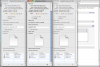
cannotaccessmicrosoftco.png

cannotaccessmicrosoftco.png


This may not be a easy problem, but I still hope all of you can help me.
Thanks in advance!
 
Thank you Elric!
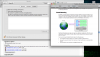
Your method works as you can see in the attachment! [UseBSDSockets Works.png]

But there is a little question:
After editing the 'network.xml',
the 'Sharing & Permissions:' changes. (But before I change the values, I, of course, make a copy of it)

Formerly, 'network.xml' is just like the other xml files,
it has 'system', 'admin', 'everyone'. Among all these, only the 'system' has the right to 'Read & Write', others are just 'Read only'.

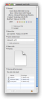
But now, the 'system' and 'admin' has gone. Instead, it becomes 'Michael (Me)' and 'staff'.
I don't know how the 'Michael (Me)' and 'staff' appears.
So, I delete 'staff' myself and add 'admin' back myself.
But it seems that I can't add 'system'.
So my concern is that:
(1) Does 'Michael (Me)' mean 'system' after changes applied?
(2) Or how can I add the 'system' back?

Now knowing what to do, so I turn 'Michael (Me)' to 'Read only' for now.
*[Something about Privilege 1.png], [Something about Privilege 2.png]

So what should I do now? Leave it alone?
Thanks in advance!

----------

By the way,
my firewall preferences in Mac OS X Leopard 10.5.7 is what you can see from [Firewall in Mac OS.png].
It 'Allow all incoming connections'.
My firewall preferences in VM is that I have turned on the Windows built-in firewall [Firewall in My VM.png],
and I have 'avast! Home Edition' installed. I know it is not a firewall but in its website, it says,

'A new resident protection module was added to avast! 4.5: the Network Shield. This module provides protection against known Internet worms/attacks. It analyses all network traffic and scans it for malicious contents. It can be viewed as a lightweight firewall (or more precisely, an IDS (Intrusion Detection System)).'

So, with the preferences in Mac OS, Windows, avast! and the 'Shared Networking'
(in the manual it says, 'you need to access the Internet from inside your virtual machine but are concerned about
security'),
does anyone know my connect in the VM is safe enough?

Thanks in advance!
 

Attachments

  • UseBSDSockets Works.png
    UseBSDSockets Works.png
    531.1 KB · Views: 9
  • Something about Privilege 1.png
    Something about Privilege 1.png
    178.4 KB · Views: 6
  • Something about Privilege 2.png
    Something about Privilege 2.png
    100.7 KB · Views: 4
  • Firewall in Mac OS.png
    Firewall in Mac OS.png
    273.6 KB · Views: 7
  • Firewall in My VM.png
    Firewall in My VM.png
    168.4 KB · Views: 7
Ah, forgot to ask:

Does anyone need to change the values in 'network.xml' after installing the Parallels Desktop?
Or my case is a special case?

Just curious about it, thanks.
 
Ah, forgot to ask:

Does anyone need to change the values in 'network.xml' after installing the Parallels Desktop?
Or my case is a special case?

Just curious about it, thanks.

Actually, it will be default mode in some upcoming version of Parallels Desktop. So far it is here just to help to solve problems like yours. It also fixes problem with connecting to sites over VPN-connection established in Mac OS through 3g-connection..

About permission: It is not a big deal. This file doesn't controls any personal data or system-critical pathes

And about firewall: I know very little about networking security and can't say anything useful about protection, sorry
 
It could be useful if you could open the file /Library/Preferences/Parallels/network.xml and replace the option
<UseBSDSockets>0</UseBSDSockets> with <UseBSDSockets>1</UseBSDSockets>. Then restart the Mac OS Host and try to connect to Microsoft-sites again. If it won't help, please send a problem report from menu Help->"Report a Problem" and post here its number.

It is rather adanced task, so please make a note if you need help with this. I'll try to describe steps in more details or will send a patch that just should be executed.

I have got the same Problem described in this discussion. I wanted to try this solution mentioned, but I cannot find the file mentioned...?! I have searched my mac even for hidden files.

What mistake do I make...? I use Parallels 4.0 - Build 4.0.4836...!

Thank you for your support.

Kind regards

Jo
 
Hi there I am also experiencing this problem, and i too cnnot find the file specified above and I have tried using the script and it hasnt worked?

Thanx
 
Hi there I am also experiencing this problem, and i too cnnot find the file specified above and I have tried using the script and it hasnt worked?

Thanx

So... you saved the file prl_use_bsd.patch to home directory and some step from the solution have reported that it "cann't find the file specified"?

Please make sure that you have copy-pasted the commands correctly.

If this doesn't help, please post here the screenshot with terminal where the commands were executed
 
sorry ill refrase that! I couldnt find the network.xml file to edit it.

I then downloaded the prl_use_bsd.patch to the home dir, then ran the terminal and entered the 3 commands exactly, then restarted the mac, then tried parallels again. It still wasnt working so i tried again, but this time I didnt restart and it still wasnt working.

Today im sat in a pub with wireless waiting to start work and everything is working fine whilst using this network. I hope that helps to narrow it down a bit.
 
I also am having this problem, and changing network.xml does not fix it for me, unfortunately. I'm running MacOS 10.6.1 (Snow Leopard), and my guest VM is Windows XP. My version of Parallels is 4.0.3848.

Now that I have made the change, here's the relevant section of that file:

Code:
            ...
            <NATServer>
               <Enabled>1</Enabled>
               <IdleConnectionTimeoutSecs>7440</IdleConnectionTimeoutSecs>
               <UseBSDSockets>1</UseBSDSockets>
            </NATServer>
            ...

After making this change, I rebooted my Mac and restarted Parallels, but I still get the same error mentioned above when going to Windows Update.

All other internet accesses work fine under my guest VM.
 
After making this change, I rebooted my Mac and restarted Parallels, but I still get the same error mentioned above when going to Windows Update.

All other internet accesses work fine under my guest VM.

Could you please send a problem report using menu of Parallels Desktop "Help" -> "Report a Problem" and post here its number?
 
Can not access microsoft domain either

Hi,

Anyone has solved this problem?

I can't access microsoft domain from my windows XP SP3 virtual machine. All other sites are ok. Tried to locate the network.xml file that was cited above but there is no such file. There is a /Library/Preferences/Parallels/network-desktop.xml, but that file doesn't contain a <UseBSDSockets> tag...

Using Parallels Desktop 5 for Mac.


Thanks in advance.
 
Back
Top