
Hello,
Running: Mac Mini 2 M2 Pro 2023; Mac OS Sonoma 14.2.1; Parallels Desktop 19.2.1 (54832); Windows 11 Pro Ver. 23H2 OS Build 22631.2861
Mac Setting
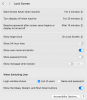
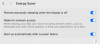
Parallels Desktop Setting
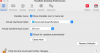
Parallels-Windows VM Setting
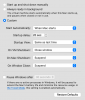
Windows 11 ARM Pro

Running: Mac Mini 2 M2 Pro 2023; Mac OS Sonoma 14.2.1; Parallels Desktop 19.2.1 (54832); Windows 11 Pro Ver. 23H2 OS Build 22631.2861
- I'm unable to stop the Windows VM from going into Suspended mode. My settings are in the screenshots below.
- Generally, I connect to the VM via RDP, but it often will not be available (suspend).
- Remote Screenshare to the host Mac, and then once logged into the Mac, Windows 11 returns to normal. All good.
- Both the host Mac and the Windows VM need to remain available 24/7.
- It is a simple issue, but I can't catch the solution by trial/error, Parallels search, or Google.
Mac Setting
Parallels Desktop Setting
Parallels-Windows VM Setting
Windows 11 ARM Pro