

David MC
Member
under Actions->Configure->Hardware->USB & Bluetooth->USB Connection Preferences, in the "List of Devices" column, when you add an item then click the popup menu to choose which device, the popup menu is A MESS:
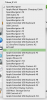
Please do 2 things:
1) separate this list into 2 sections: Currently Connected and NOT currently connected and
2) Alphabetize the sections
thanks
Please do 2 things:
1) separate this list into 2 sections: Currently Connected and NOT currently connected and
2) Alphabetize the sections
thanks