Cloned a Windows 8.1 but VM doesn't start - repair required

I used the ||-Tool to clone an existing physical machine (HP-Notebook). 60GB were transfered and the process went very smooth and flawless what the operating and setup was concerned.

But it ended up in Windows 8.1 not booting (with an error 0x0000000f)
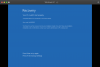
upload_2020-9-17_8-14-3.png

How should I proceed?

Assumed I can get Windows 8.1 installation media from somewhere,

how do I make an USB-Stick accessible to Parallels?

how do I get into F8 mode? Tried fn-F8 to no avail.
 
Meanwhile I created a bootable Windows 8.1 Installation media on a USB-Stick. I can verify, that the stick boots physically when I connect it to my Lenovo Notebook.

Connecting it to my MacbookPro (Catalina 10.15.6, Parallels Desktop 16) doesn't make the VM boot from the stick.
I get an UEFI prompt but cannot choose any boot device. Instead the VM always boots into the - damaged - VM.
upload_2020-9-17_16-9-6.png

But the VM doesn't accept any key and doesn't go into the boot menu.
 
I got a bit further: I switched off the option to choose the boot device. Then the system booted the USB stick and I could get into the Windows 8.1 repair mode. Although it seemed to me that the VM didn't catch keystroke and mouse action in the beginning. Took very long until I could operate the NExt button with the mouse arrow.
 
To add some info to the picture: the cloned machine is an HP 11 Pavilion notebook with UEFI boot. I tried to add the flag vm.bios.efi=0 to no avail.
I can't simply boot the cloned VM.

Please help.
 
Back
Top