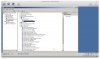
"Code 12" Ethernet adapter and Parallels Tool device in Bootcamp VM

StuartD

Bit poster
Hi,

Has anybody else had this issue - parallels desktop 4, latest build, parallels tools installed. The networking does not work, as the ethernet adapters come up with the yellow triangles in the device manage - "Code 12" not enough resources available. The parallels tools device has the same thing. I have tried reinstalling the devices, disabling and re-enabling, re-installing parallels to no avail.

Vista OS
Bootcamp partition
Mac OS Leopard 10.5.7
Macbook 2.2 Core 2 Duo
2GB RAM

hope to get this working soon

Stu
 
Please clarify what is Parallels Tools device and what devices are with exclamation marks? Probably you could attach the screenshot. Anyway try deleting the network adapter from the configuration of the virtual machine, start it, delete the network adapter from the device manager on Windows side, shutdown the virtual machine and add the network adapter once again ("+" button under the devices list)
 
Screenshot

I am unable to work out what the device is, but I have attached the screenshot. Any other information needed? I have tried what you suggested, several times. I even added another network adapter, as you can see from the screenshot, with the same results. It is driving me nuts, because I am happy with the speed and other parallels benefits

Stu
 

Attachments

  • Untitled.jpg
    Untitled.jpg
    177.8 KB · Views: 15
Thank you for the info, it seems Parallels Tools don't get properly installed. Could you please submit a problem ticket here and let me know its ID.
 
#725980

This ticket was created, I have removed, and re-installed Parallels tools to no avail. Your help is appreciated

Stu
 
Didn't turn up to Meeting

A meeting was booked, and no-one turned up - anything happening with this issue - Parallels is unusable to me without the networking.

Ticket #725980 was what the Mikogo meeting was booked under

No very happy

Stuart
 
Support Fixed the issue

Hi, it took several hours of remote support on my Macbook to fix this issue - they were very good, and I left them to it, however it wasn't something I could fix myself, or talk you through. I would log a support request for this.

Stu
 
Back
Top