
I'm using:
In Photoshop RGB values look the way it should be, warmer yellow.
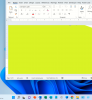
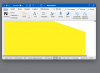
In PPT and Word mac version of Microsoft, colours show okay, but when opened in PPT and Word in Windows Parallels colours show wrong.
When exporting to pdf in Parallels colours show okay again.
Viewed in PPT and Word on genuine Windows computer colours show okay.
So it only occurs in Office applications opened in Parallels.
How can I solve this?
- macOS Monterey version 12.2.1
- Parallels Desktop 17 for Mac version 17.1.7 (51588)
In Photoshop RGB values look the way it should be, warmer yellow.
In PPT and Word mac version of Microsoft, colours show okay, but when opened in PPT and Word in Windows Parallels colours show wrong.
When exporting to pdf in Parallels colours show okay again.
Viewed in PPT and Word on genuine Windows computer colours show okay.
So it only occurs in Office applications opened in Parallels.
How can I solve this?