Long time user of VMWare, but older version no longer working, and now in trial period for Parallels, on 2019 iMac. Installed with default Windows 10 installation. When I hit Command-Q to quit, nothing happens. If I use the mouse to quit from the menubar, it quits. So first question is why isn't the keyboard Command-Q working?
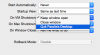
Also, I found the setting to automatically start Windows when opening Parallels, and that works (other than annoying trial splash screen to get through). But when I quit Windows, Parallels remains running and need to quit that separately. I'm sure that is a simple fix, but can't find where to set that correctly. With VMWare, it was very seamless in opening VMWare automatically launched Windows and quitting from Windows quit VMWare as well... thanks!
Also, I found the setting to automatically start Windows when opening Parallels, and that works (other than annoying trial splash screen to get through). But when I quit Windows, Parallels remains running and need to quit that separately. I'm sure that is a simple fix, but can't find where to set that correctly. With VMWare, it was very seamless in opening VMWare automatically launched Windows and quitting from Windows quit VMWare as well... thanks!