jolson@mtu.edu
Bit poster
Hello,
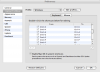
Parallels is configured (I have not changed the default windows profile) to pass Command + V as Control + V to my windows guest. Command + A and Command + C are configured similarly.
Command + A and Command + C are functioning, but Command + V is not.
Note that if I press the command key on its own, the start menu pops up.
I am running Parallels 4.0 build 3810 in full screen mode. Is anyone else experiencing similar issues?
Parallels is configured (I have not changed the default windows profile) to pass Command + V as Control + V to my windows guest. Command + A and Command + C are configured similarly.
Command + A and Command + C are functioning, but Command + V is not.
Note that if I press the command key on its own, the start menu pops up.
I am running Parallels 4.0 build 3810 in full screen mode. Is anyone else experiencing similar issues?