Dock Icons not showing for Windows Applications

DOCa Cola

Member
Hi!

I am using Parallels 7 under Mac OS X Lion (10.7.2). In the past all applications i started showed up correctly in the dock as expected. Recently this changed and i am not sure about the circumstances.
For example when i start the windows notepad from the Windows Start Menu (doesn't matter if coherence mode or not) then for a slit second the Notepad icon pops up in the Mac OS dock, but disappears right after that again.
Something similar happens if i try to start a Windows Application from the Parallels Dock folder (where the Start Menu is mirrored). The icon shows for about one second, then disappears, however, the selected application does NOT start in the virtual machine.

What i tried so far:
I have completely uninstalled Parallels and removed my virtual machine (made a backup). Removed all remaining configuration files (including windows "placeholder apps") from the HDD associated with Parallels. Installed Parallels from scratch and set up a brand new Windows XP (and later on even a Windows 7) virtual machine. Both show the same strange behavior. I left all settings on the default for the new Virtual Machines.

What i have noticed:
When i try to launch an windows application from the Dock or from Windows Start Menu, in the console, usually this message appears:
10.11.11 10:51:41,492 WinAppHelper: NSDocumentController Info.plist warning: The values of CFBundleTypeRole entries must be 'Editor', 'Viewer', 'None', or 'Shell'.
Google reveals that this message seem to appear for a number of applications in lion and may have nothing to do with the issue i am experiencing at all.

I hope someone has an answer for me. Thank you

Edit: I noticed that the dock 'start menu' links for Control Panel or My Computer show as expected (despite no icon showing up in the dock when launching them). However applications like Notepad or Paint don't work
 
Last edited:
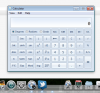
I am seeing the same behavior. I switched my Windows 7 Ultimate VM to Coherence mode and when I start a Windows application, the dock icon for the Windows application is invisible. The screen shot below shows Calculator with an invisible icon. The icon is also invisible when I hit Cmd + Tab to switch between apps.

This bug makes showing Windows app icons in the dock useless.
 

Attachments

  • InvisibleDockIcon.png
    InvisibleDockIcon.png
    89.2 KB · Views: 52
on my machine the icons do appear for a split of a second (correctly) but then the helper application in the dock just quits without any reason (while the windows app in the vm itself continues to run as expected)
i'd really like to understand why this happens

edit: I wonder where the message from the user LePondeD went. he reported the exact same issue as i am experiencing
 
Last edited:
After uninstalling Parallels using the steps on kb.parallels.com/en/112189, I reinstalled and Coherence is now OK. Dock icons for Windows apps now show up correctly.
 
uninstalled Parallels Tools from the VM, uninstalled Parallels, followed the KB. Then re-installed Parallels. Still have the same issue :/ Maybe it is something system specific, however i don't have issues with any other applications
 
figured it out now: My personal firewall ("Hands Off!") blocked the parallels helper applications from connecting to parallels locally. i reset the rules and now all is working fine again.
 
After uninstalling and re-installing Parallels, the dock icons appear correctly for awhile under Coherence but after some period of time, the issue resurfaces.

Uninstalling and reinstalling Parallels each time this issue surfaces is not a sufficient workaround. Are there plans to fix this issue permanently?
 
I have the exact same problem as DOCa Cola. Was running fine until yesterday afternoon, when WinAppHelper crashed and the dock icons disappeared. Figured it was a temporary thing that'd be fixed by the next time the Mac was booted, but it wasn't.

I have the same WinAppHelper error messages in the Console logs, and the same symptoms with the dock icons showing for a split second before quitting, but unlike DOCa Cola, I don't have any sort of firewall which may be interferring. I have uninstalled Parallels completely as per KB article above before reinstalling as well as reinstalling Parallels Tools and the problem persists. :(
 
Here is what Parallels support had me do to try to fix this.

1. Make a backup of the .plists required for deleting (com.apple.dock.plist and com.apple.dock.extra.plist from the folder ~/Library/Preferences) - just copy them someplace so that you could restore them if the issue persists,
2. Delete the original files in folder ~/Library/Preferences ,
3. Reboot your host Mac with the option to reopen all windows on logging back in.

In addition to steps #1 and #2 above, I also deleted the Applications (Parallels) folder in my home folder before rebooting my MacBook Pro.

So far, the Dock icons for Windows apps are now showing up. The other workaround (re-installing Parallels) also fixed this but the issue resurfaced after about 1 week. Please note that I leave PD7 and my Windows 7 running all of the time and I rarely reboot my MacBook Pro.
 
jkwuc89's solution works

If you have this problem, the solution posted above worked for me. And it's a much better solution than removing and reinstalling Parallels. However, there should be a solution for this from Parallels - fix the problem please.
 
Had the same problem with Parallels 8 and Windows 8. Discovered by chance that if I shut down the Windows VM, and then under Virtual Machine > Configure > Applications I toggled "Show Windows Application Folder in Dock" off and then on again. Quit Parallels. Then launched Parallels and the VM and the problem was resolved.

IMO, from bad experience in the past, the advice to uninstall and reinstall Parallels can result in nasty and costly problems with Windows licensing.
 
Here is what Parallels support had me do to try to fix this.

1. Make a backup of the .plists required for deleting (com.apple.dock.plist and com.apple.dock.extra.plist from the folder ~/Library/Preferences) - just copy them someplace so that you could restore them if the issue persists,
2. Delete the original files in folder ~/Library/Preferences ,
3. Reboot your host Mac with the option to reopen all windows on logging back in.

In addition to steps #1 and #2 above, I also deleted the Applications (Parallels) folder in my home folder before rebooting my MacBook Pro.

So far, the Dock icons for Windows apps are now showing up. The other workaround (re-installing Parallels) also fixed this but the issue resurfaced after about 1 week. Please note that I leave PD7 and my Windows 7 running all of the time and I rarely reboot my MacBook Pro.

Thank you for your solution; that works for me. I can't believe this bug still exists in 2024.
 
Back
Top