Just got a brand new iMac 2.4 GHz Core 2 Duo w/ 1 GB of RAM. Installed Boot Camp with
Windows XP along with Mac Office (Student Ed). When I installed Parallels, I notice something
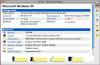
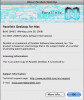
wrong right away. I've attached some screen shots as a picture is worth a thousand words!
Still, I tried working through the 'broken' interface and attempted to install Windows XP, but
could only get to step 6 of the Quick Start Guide (pg 5). It says to "Choose Default CD/DVD-ROM
from the Devices menu," except that all the devices listed there are unselectable! (They
are all grey, none are black.)
Do I have a bad install disk? Or is it something else?
If I can supply any additional information, please ask. Many thanks in advance!
Windows XP along with Mac Office (Student Ed). When I installed Parallels, I notice something
wrong right away. I've attached some screen shots as a picture is worth a thousand words!
Still, I tried working through the 'broken' interface and attempted to install Windows XP, but
could only get to step 6 of the Quick Start Guide (pg 5). It says to "Choose Default CD/DVD-ROM
from the Devices menu," except that all the devices listed there are unselectable! (They
are all grey, none are black.)
Do I have a bad install disk? Or is it something else?
If I can supply any additional information, please ask. Many thanks in advance!