I'm using Parallels build 1970 on a 1st gen MacBookPro running 10.4.8 with 2 GB of RAM.
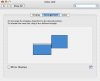
I have an external monitor set up with my MBP as the second display. In the displays control panel, I have the second monitor to the right and slightly above the MBP display (so that the bottom line of the second monitor is about halfway up the MBP screen). My virtual machine is full-screen on the second display. When I use the Start Menu or anything that uses mouse hovers, they mouse hovering stops at the top of the primary display, not the secondary display.
So when I open the start menu and move my mouse up it, normally the entry under my mouse is highlighted. As soon as my mouse moves past the top of the primary display (which is halfway up the secondary), the mouse highlighting stops. Clicking on things still works, but there's no hover feedback, which makes things somewhat annoying to work with in certain apps.
Has anybody seen this issue? I've attached a screenshot of my Displays control panel.
Regards,
Scott
I have an external monitor set up with my MBP as the second display. In the displays control panel, I have the second monitor to the right and slightly above the MBP display (so that the bottom line of the second monitor is about halfway up the MBP screen). My virtual machine is full-screen on the second display. When I use the Start Menu or anything that uses mouse hovers, they mouse hovering stops at the top of the primary display, not the secondary display.
So when I open the start menu and move my mouse up it, normally the entry under my mouse is highlighted. As soon as my mouse moves past the top of the primary display (which is halfway up the secondary), the mouse highlighting stops. Clicking on things still works, but there's no hover feedback, which makes things somewhat annoying to work with in certain apps.
Has anybody seen this issue? I've attached a screenshot of my Displays control panel.
Regards,
Scott