EFI Boot

  • Thread starter Thread starter Parallels User
  • Start date Start date
At VM configuration menu choose "Boot Order" element and in a drop-down field "Advanced Settings" add a string "vm.bios.efi=64"
 
>>> Message has been deleted by the user <<<
 

Attachments

  • Screen Shot 2019-11-21 at 8.38.34 AM.jpg
    Screen Shot 2019-11-21 at 8.38.34 AM.jpg
    200.6 KB · Views: 72
  • Screen Shot 2019-11-21 at 8.38.25 AM.jpg
    Screen Shot 2019-11-21 at 8.38.25 AM.jpg
    76.3 KB · Views: 65
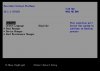
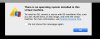
1. There is no EFI system partition with FAT on a virtual disk
2. There is no EFI loader file called EFI\BOOT\bootx64.efi

Try to locate it manually selecting "Boot Maintenance Manager" -> "Boot From File"
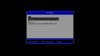
Also it would be helpful if you provide a screenshot of this window called "File Explorer" if you won't be able to locate EFI loader.
In common case you shall press on entry "EFISECTOR", [PciRoot(0x0)/Pci(0, 0x1F, XXX)/{Ide,Scsi,Sata,NVMe}/HD(X,GPT,XXXX], then "EFI", then "Boot", then "bootx64.efi"

It would be more helpful if you choose "Send Technical Data" and share its ID. At this moment I know nothing about VM you trying to start: how many disks, what guest OS and so on.
 
>>> Message has been deleted by the user <<<
 

Attachments

  • Screen Shot 2019-11-22 at 8.19.35 AM.jpg
    Screen Shot 2019-11-22 at 8.19.35 AM.jpg
    422.4 KB · Views: 48
Hmm. You do have a bootcamp based VM. How bootcamp data was moved to new MAC?
Is native bootcamp able to boot?
 
There is another test probably you can try. I had to use Lagecy BIOS as well but found adding "vm.bios.efi=64" in Boot Flags did not work. I tried to open the .pvm fold and locate to config.pvs. You can find "<EfiEnabled>" label in that xml file and change it from 1 to 0. Then probably you can get the legacy BIOS without EFI.
I'm a Paralles user so this is not an official response. You will take your own risk. :)
 
Back
Top