Craig Seeman
Bit poster
MacPro 8 core OS 10.5.7
8GB RAM
Parallels 4.0.3844
Additional Internal 500GB hard drive single partition (entire drive) Boot Camp Windows XP Home SP3, NTFS formated
Boot Camp into Windows OS works fine so no apparent problem with OS
Start Parallels Desktop
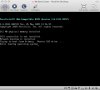
black screen goes to
Trying to boot form Primary Master IDE drive ...
Error loading operating system_
Installed just a few days ago Parallels installed without issue and Boot Camp Windows XP opened and ran without issue
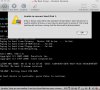
Recently I got Unable to connect to Hard Disk 1.
Now I get the above error messag.
I can't find how to trouble shoot this nor do I know what caused it.
How should I proceed?
Thanks in advance
8GB RAM
Parallels 4.0.3844
Additional Internal 500GB hard drive single partition (entire drive) Boot Camp Windows XP Home SP3, NTFS formated
Boot Camp into Windows OS works fine so no apparent problem with OS
Start Parallels Desktop
black screen goes to
Trying to boot form Primary Master IDE drive ...
Error loading operating system_
Installed just a few days ago Parallels installed without issue and Boot Camp Windows XP opened and ran without issue
Recently I got Unable to connect to Hard Disk 1.
Now I get the above error messag.
I can't find how to trouble shoot this nor do I know what caused it.
How should I proceed?
Thanks in advance