I had Desktop for Mac 3 installed and want to downgrade to Build 3188. I ran the uninstaller included with Build 4560 and restarted.
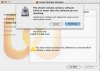
I then started the installer for Build 3188 and was presented with the notice: "The chosen volume contains software which is newer then (sic) the software you are installing. Installing this software will replace the newer version with an older version. [cancel] [continue]"
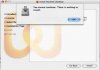
I clicked "Continue" and was presented with this error: "You cannot continue. There is nothing to install. [OK]"
In addition to using the Parallels uninstaller, I've followed the suggestions for using a terminal script to remove Parallels, to no avail.
Anyone encountered these errors before and know what to do?
I then started the installer for Build 3188 and was presented with the notice: "The chosen volume contains software which is newer then (sic) the software you are installing. Installing this software will replace the newer version with an older version. [cancel] [continue]"
I clicked "Continue" and was presented with this error: "You cannot continue. There is nothing to install. [OK]"
In addition to using the Parallels uninstaller, I've followed the suggestions for using a terminal script to remove Parallels, to no avail.
Anyone encountered these errors before and know what to do?