
I have upgraded to Parallels Desktop 13, and I have upgraded my Mac to High Sierra.
I am trying to create a VM of High Sierra via the recovery partition, and it's just dropping to a shell prompt saying no OS exists after the initial VM is created and the Mac logo screen finishes.
Any idea's on what's happening?
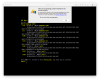
I am trying to create a VM of High Sierra via the recovery partition, and it's just dropping to a shell prompt saying no OS exists after the initial VM is created and the Mac logo screen finishes.
Any idea's on what's happening?