
Running trial version Parallels 14. The only thing I want to use it for is to run Quicken windows.
I noticed at setup it copied all my mac files and desktop files onto Parallels. I went into configure-Sharing- share Mac and unchecked all buttons and under share folders I have None.
Under share windows I still have Access windows folders on mac and Share one drive with Mac checked
I can back up quicken file to external drive, but can't seem to backup quicken to Parallels desktop.
Can some recommend how I can do that?
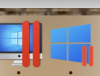
Also, when I open Parallels my Mac dock shows a one icon as parallels desktop and another icon showing windows 10, is that what it should show as open, when I open Parallels.
I am not sophisticated in running these operations, any direction you can share on configuration would be appreciated.
I noticed at setup it copied all my mac files and desktop files onto Parallels. I went into configure-Sharing- share Mac and unchecked all buttons and under share folders I have None.
Under share windows I still have Access windows folders on mac and Share one drive with Mac checked
I can back up quicken file to external drive, but can't seem to backup quicken to Parallels desktop.
Can some recommend how I can do that?
Also, when I open Parallels my Mac dock shows a one icon as parallels desktop and another icon showing windows 10, is that what it should show as open, when I open Parallels.
I am not sophisticated in running these operations, any direction you can share on configuration would be appreciated.
