
Why do I have the icons from XP on my mac desktop?
Hi guys,
I am a long time Mac User and only recently started using parallels 4.0. So I am quite new to the VM.
I have installed WinXP, and I have been using for a while now.
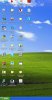
My question is that why cannot the files on the XP desktop stay there and show up when I am in the XP Virtual Machine. I find they show up on my Mac OS desktop with the two red parallel lines.
Is there a way to keep XP desktop in XP and the Mac desktop in Mac?
Please see screenshots. I do not want the parallels files showing up when I am in Mac, is that possible?
Thanks for any help.
Hi guys,
I am a long time Mac User and only recently started using parallels 4.0. So I am quite new to the VM.
I have installed WinXP, and I have been using for a while now.
My question is that why cannot the files on the XP desktop stay there and show up when I am in the XP Virtual Machine. I find they show up on my Mac OS desktop with the two red parallel lines.
Is there a way to keep XP desktop in XP and the Mac desktop in Mac?
Please see screenshots. I do not want the parallels files showing up when I am in Mac, is that possible?
Thanks for any help.
Attachments

Last edited: