
My Mac accidentally lost power. When I booted up again and tried to run Windows 10 via Parallels 12.1.1 I got a blue screen stating:
"Recovery
Your PC/Device needs to be repaired
The Boot Configuration Data for your PC is missing or contains errors.
File:\EFI\Microsoft\Boot\BCD
Error code: 0xc000014c
You'll need to use recovery tools. If you don't have any installation media (like a disc or USB device), contact your PC administrator or PC/Device manufacturer."
I believe I have the Windows 8 discs that I originally used to install Windows on this machine, but I upgraded to Windows 10 via a download when it was free to do so.
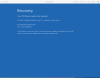
Attached is a screenshot showing the blue screen.
"Recovery
Your PC/Device needs to be repaired
The Boot Configuration Data for your PC is missing or contains errors.
File:\EFI\Microsoft\Boot\BCD
Error code: 0xc000014c
You'll need to use recovery tools. If you don't have any installation media (like a disc or USB device), contact your PC administrator or PC/Device manufacturer."
I believe I have the Windows 8 discs that I originally used to install Windows on this machine, but I upgraded to Windows 10 via a download when it was free to do so.
Attached is a screenshot showing the blue screen.
Attachments
Last edited:
