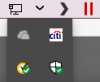
D DavidM27 Bit poster Jun 19, 2017 #1 On my Sierra menubar there is a down arrow that shows 4 apps: How do I change the apps?
A Ajith1 Parallels Support Jun 25, 2017 #2 DavidM27 said: On my Sierra menubar there is a down arrow that shows 4 apps: View attachment 12636 How do I change the apps? Click to expand... These icons are already added to notification bar during startup. You can remove then by removing it from startup items but we can not assure if you can add all programs there.
DavidM27 said: On my Sierra menubar there is a down arrow that shows 4 apps: View attachment 12636 How do I change the apps? Click to expand... These icons are already added to notification bar during startup. You can remove then by removing it from startup items but we can not assure if you can add all programs there.