

Elric
Parallels Team
This post is about how to make Solaris 10 work in Parallels Desktop 5.0.9220
1) Installing Solaris: The Solaris 10 and current version of PD5 are not in friendly terms on ACPI-tables.
To workaroung it is required to forcibly turn on APIC for VM for the install would be able to proceed:
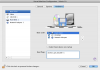
- Enable APIC for the Solaris VM by opening the VM configuration (menu of Parallels Desktop "Virtual Machine" -> "Configure") -> "Hardware" -> "Boot Order" and entering in the BootFlags line "devices.apic.disable=0" without quotes
After install this flag (see the screenshot) should be enabled back by changing the line to be "devices.apic.disable=1"
How to install network driver:
2) The Solaris 10 in Parallels Desktop 5.0 now boots in 64bit mode. The shipped with Parallels Desktop Solaris Network driver supports 64bit, but some actions should be taken to install it.
Connect to the VM the image "/Library/Parallels/Tools/prl-tools-other.iso". Copy the content of folder "Drivers/Network/RTL8029/SOLARIS" in VM to say /tmp. Edit the file network.sh and add the three following lines just before the line "echo "Compiling driver ...":
PATH=$PATH:/usr/sfw/bin
rm $driver/Makefile
ln -s $tmpdir/$driver/Makefile.amd64_gcc $tmpdir/$driver/Makefile
then execute network.sh under root
This should bring 64bit network driver to the Solaris 10 installation
Alternatively, it is possible to just configure the Solaris to boot into 32bit mode (not covered in this HowTo)
This should make the Solaris 10 VM fully functional under Parallels Desktop 5.0
1) Installing Solaris: The Solaris 10 and current version of PD5 are not in friendly terms on ACPI-tables.
To workaroung it is required to forcibly turn on APIC for VM for the install would be able to proceed:
- Enable APIC for the Solaris VM by opening the VM configuration (menu of Parallels Desktop "Virtual Machine" -> "Configure") -> "Hardware" -> "Boot Order" and entering in the BootFlags line "devices.apic.disable=0" without quotes
After install this flag (see the screenshot) should be enabled back by changing the line to be "devices.apic.disable=1"
How to install network driver:
2) The Solaris 10 in Parallels Desktop 5.0 now boots in 64bit mode. The shipped with Parallels Desktop Solaris Network driver supports 64bit, but some actions should be taken to install it.
Connect to the VM the image "/Library/Parallels/Tools/prl-tools-other.iso". Copy the content of folder "Drivers/Network/RTL8029/SOLARIS" in VM to say /tmp. Edit the file network.sh and add the three following lines just before the line "echo "Compiling driver ...":
PATH=$PATH:/usr/sfw/bin
rm $driver/Makefile
ln -s $tmpdir/$driver/Makefile.amd64_gcc $tmpdir/$driver/Makefile
then execute network.sh under root
This should bring 64bit network driver to the Solaris 10 installation
Alternatively, it is possible to just configure the Solaris to boot into 32bit mode (not covered in this HowTo)
This should make the Solaris 10 VM fully functional under Parallels Desktop 5.0
Attachments
Last edited: