Success!
I found this info and this exact procedure worked for me. I can now see the USB ports.
******************************************
How I got USB drive to be recognized (XP Pro)
This affected a new installation of Parallels Desktop 3.0 (5608) with Windows XP Pro guest OS on Leopard 10.5.4.
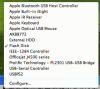
The USB drive would show up in Parallels Devices as checked, but Windows would never notice the USB drive.
Received the following from Ekaterina Tuzova at Parallels Tech Support which resolved the issue:
1. Start Windows guest OS, go to Start -> Control Panel -> System -> Device Manager and uninstall all devices under the Universal Serial Bus Controllers (right-click the devices).
2. Shut down your VM.
3. In VM Configuration Editor, delete the USB Controller and start Windows guest OS again.
4. Wait 5-10 minutes until Windows finishes the driver setup.
5. Shut down Windows.
6. Add "USB Controller" back to your VM configuration and start Windows again.
In my case, in step 4 Windows never appeared to do any driver setup, Windows installed USB drivers after step 6 when I reinserted the USB device.
Now works as expected, USB drive visible in Windows. This avoids the (low performance) workarounds like creating a link to the USB drive and accessing through Parallels Shared Folders.
(Those not in US can substitute recognise for recognize above.)
*************************************
macbook pro 2.8GHz 4G
Snow Leapord 10.6 all current updates
XP sp3 all current updates
Parallels 5 all current updates

 . Is this normal behavior? If I re-assign it to the xp side, it disappears from the mac side and from MyComputer on the xp side.