I purchased 4.0 about a month ago.
After uninstalling PD3 the following occured during installing:
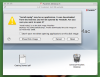
1. Install tries to opened with the Text Editor (Picture 1.png). My understanding is that this correct.
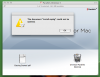
2. The error message The document "Install.mpgk" could not be opened is shown (Picture 2.png)
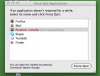
3. Parallels Installer hangs itself and a Force Quit is needed (Picture 3)
4. The service people have tried to reestablish a link through a different software to open the install but I am afraid something is corrupt in my Leopard that I cannot fix
All of these problems don't occur as soon as I reinstall PD3 which still runs OK.
Please help!!!
After uninstalling PD3 the following occured during installing:
1. Install tries to opened with the Text Editor (Picture 1.png). My understanding is that this correct.
2. The error message The document "Install.mpgk" could not be opened is shown (Picture 2.png)
3. Parallels Installer hangs itself and a Force Quit is needed (Picture 3)
4. The service people have tried to reestablish a link through a different software to open the install but I am afraid something is corrupt in my Leopard that I cannot fix
All of these problems don't occur as soon as I reinstall PD3 which still runs OK.
Please help!!!