
Install the app
How to install the app on iOS
Follow along with the video below to see how to install our site as a web app on your home screen.
Note: This feature may not be available in some browsers.
You are using an out of date browser. It may not display this or other websites correctly.
You should upgrade or use an alternative browser.
You should upgrade or use an alternative browser.
Installation problem: Windows could not create partition on disk 0
- Thread starter Fly1
- Start date
S
Sathiya@Parallels
Hi Fly1. Are you trying to install Windows using the ISO image or through the installation assistant provided within Parallels Desktop?Hi all,
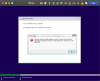
tired to install Parallels and Windows and get this error during windows installation.
Windows could not create partition on disk 0
See screenshot. Any help is appreciated.

Hi @Fly1, you're welcome! We appreciate the time and effort that you have invested in to fix the issue!Problem solved in the meantime.. Thanks for getting back..
Follow the steps below to install Windows manually and resolve the issue.I have the same problem, can you post the solution @Fly1? Thanks
1. Download Windows 10 ISO - https://www.microsoft.com/en-in/software-download/windows10
2. Start the virtual machine creation as mentioned in https://kb.parallels.com/4729 but when you are on the screen to select the ISO and continue to select "Locate Manually" then select "Continue without a source" then proceed to select Operating System.
3. Choose the profile for your virtual machine.
4. Give a name for the virtual machine and create. You will get a no boot screen.
5. Use Actions (on Mac menu bar) > Stop.
6. Now you can see the empty VM on Parallels Desktop Control Center.
7. Now you can mount( https://kb.parallels.com/8638 ) the Windows 10 ISO and start the virtual machine which will start Windows installation manually.
8. Don't enter Windows key during installation select "I don't have a key". You can complete the activation after the installation is complete.
9. Install Parallels Tools (see http://kb.parallels.com/115835 for assistance).
@JesusL1I have the same problem, can you post the solution @Fly1? Thanks
Sorry I forgot how I did it. It was not like Support described above. That did not work for me.
I think it was some Setting I did not allow. Maybe it was allowing Parallels to control my Mac in Control Center Permissions that did the trick.. Something like that.
I recently bought another copy for my iMac and gave all permissions in the installation process and had no installation issues.
Let me know if that worked out for you.
Fly1