
Install the app
How to install the app on iOS
Follow along with the video below to see how to install our site as a web app on your home screen.
Note: This feature may not be available in some browsers.
You are using an out of date browser. It may not display this or other websites correctly.
You should upgrade or use an alternative browser.
You should upgrade or use an alternative browser.
Installing Bluetooth on Mac Pro
- Thread starter dvdborn
- Start date
OK this is completely silly, but that's how I managed to get bluetooth working in Parallels on my MBP 17".
1) starting point: no way I could get OS X "release" integrated bluetooth for parallels to use
2) plug a bluetooth dongle: OS X imediately takes "ownership" of it, releasing integrated bluetooth (even with USB autoconnect in parallels). Parallels can now use integrated bluetooth, but I've not found any driver doing the trick. If anyone knows about that, pretty please tell us!
3) plug a SECOND bluetooth dongle: not clear what OS X is doing, but at least one of the two dongles is now available to parallels. The dongles I use are MSI BToes, and are recognized by WinXP SP2 without any additional drivers.
It is way silly to have THREE bluetooth devices at the same time, but at least I can use one in parallels, which I badly need at the moment...
Hope this helps...
Antoine
1) starting point: no way I could get OS X "release" integrated bluetooth for parallels to use
2) plug a bluetooth dongle: OS X imediately takes "ownership" of it, releasing integrated bluetooth (even with USB autoconnect in parallels). Parallels can now use integrated bluetooth, but I've not found any driver doing the trick. If anyone knows about that, pretty please tell us!
3) plug a SECOND bluetooth dongle: not clear what OS X is doing, but at least one of the two dongles is now available to parallels. The dongles I use are MSI BToes, and are recognized by WinXP SP2 without any additional drivers.
It is way silly to have THREE bluetooth devices at the same time, but at least I can use one in parallels, which I badly need at the moment...
Hope this helps...
Antoine
Easier Way
Thanks to your help, I figured out a much easier way to get bluetooth working and you don't even need a single dongle. First, go to the terminal and type:
sudo kextunload -b com.apple.driver.AppleUSBBluetoothHCIController
You will need the root password for your computer to do this. If you have not setup a root password, you will need to set this up. You may have to google to figure out how to setup a root / superuser account for OSX.
If you want to use a dongle, it maybe using a different driver, so try:
sudo kextunload -b com.apple.driver.CSRUSBBluetoothHCIController
If you do a kextstat, it will display all loaded kernel extensions. You can use this
'sudo kextunload -b [bundle name] to temporarily remove all bluetooth related kernel extensions currently in use.
One you have unloaded these extensions, you will then be able to connect them as usb devices in windows on parallels. These instructions assume that either you don't have a dongle, or you want to use the dongle in windows instead of the built in bluetooth in windows. These directions will temporarily disable bluetooth functionality in OSX. On the other hand, if you have a dongle, and you don't mind using the built-in bluetooth on your computer in Windows, simply plug in your dongle and OSX will free up the built-in bluetooth adapter for use in windows. As far as I can tell, sp2 seems to automatically install the drivers. If this doesn't work for you, try the bootcamp drivers.
Thanks to your help, I figured out a much easier way to get bluetooth working and you don't even need a single dongle. First, go to the terminal and type:
sudo kextunload -b com.apple.driver.AppleUSBBluetoothHCIController
You will need the root password for your computer to do this. If you have not setup a root password, you will need to set this up. You may have to google to figure out how to setup a root / superuser account for OSX.
If you want to use a dongle, it maybe using a different driver, so try:
sudo kextunload -b com.apple.driver.CSRUSBBluetoothHCIController
If you do a kextstat, it will display all loaded kernel extensions. You can use this
'sudo kextunload -b [bundle name] to temporarily remove all bluetooth related kernel extensions currently in use.
One you have unloaded these extensions, you will then be able to connect them as usb devices in windows on parallels. These instructions assume that either you don't have a dongle, or you want to use the dongle in windows instead of the built in bluetooth in windows. These directions will temporarily disable bluetooth functionality in OSX. On the other hand, if you have a dongle, and you don't mind using the built-in bluetooth on your computer in Windows, simply plug in your dongle and OSX will free up the built-in bluetooth adapter for use in windows. As far as I can tell, sp2 seems to automatically install the drivers. If this doesn't work for you, try the bootcamp drivers.
Thanks for this information. I seem to remember that I unsuccessfully tried the kextunload way, but maybe I did something wrong. I will try again soon and post the result.
Regarding using integrated BT in SP2, I have to report that this did not work. I did use the dongle trick to free the internal BT, windows did detect it but it was unable to install a driver. I'll try again, but i'm quite sure about that. What computer do you have? I've got a MacBook Pro 17" Core Duo (original model). You may have a different BT chip than me, which could explain this behavior.
Best,
Antoine
Regarding using integrated BT in SP2, I have to report that this did not work. I did use the dongle trick to free the internal BT, windows did detect it but it was unable to install a driver. I'll try again, but i'm quite sure about that. What computer do you have? I've got a MacBook Pro 17" Core Duo (original model). You may have a different BT chip than me, which could explain this behavior.
Best,
Antoine
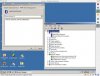
I'm using the macbook. Below is a picture of the parallels windows, and the device id is visible. I just reinstalled windows and the procedure I used is the kextunload on both of the bundles to free the apple built-in bluetooth. Once that was done, i connected the Apple Wireless device in parallels. This time it did not automatically install the drivers in windows (i must have been mistaken before), so I installed the boot camp drivers. This will crash windows and leave the Bluetooth PAN not quite installed as I think windows crashed during the installation of the driver. One you return to windows, uninstall the PAN device, and windows will find it again and successfully install the driver. This all assumes XP SP2.
Attachments
thanks for the valuable information. however, i'm still having troubles.
here is what I did:
1) install bootcamp drivers & reboot -- note: i did not have the crash you describe, maybe because the internal BT was not yet "plugged"
2) "plug" internal BT (by plugging a dongle for OSX to release the internal BT -- i've not tried the kextunload trick yet)
winxp sp2 successfully detected the hardware and installed things. i could see nearby devices (although they were not completely indentified in GUI -- only the hardware address would be displayed) but when trying to pair a device, after a long wait, i ended up with a Blue Screen of Death(tm). Mmmh. Maybe I messed my xp install. I'd be interested to hear anyone else's feedback...
here is what I did:
1) install bootcamp drivers & reboot -- note: i did not have the crash you describe, maybe because the internal BT was not yet "plugged"
2) "plug" internal BT (by plugging a dongle for OSX to release the internal BT -- i've not tried the kextunload trick yet)
winxp sp2 successfully detected the hardware and installed things. i could see nearby devices (although they were not completely indentified in GUI -- only the hardware address would be displayed) but when trying to pair a device, after a long wait, i ended up with a Blue Screen of Death(tm). Mmmh. Maybe I messed my xp install. I'd be interested to hear anyone else's feedback...
Hey there! I´ve read all your posts. I tried hard to connect my mobile via internal BT adapter.
First decade i can´t found an good working way to do.
Then i pluged in my old dlink dbt-120 bt adapter which is full supported by apple. It was shown directly in the usb devices. after i activate it for parallels my win xp found a new USB device and installed it without any external drivers. i started my nokia phone suite an it works greate.
Best regards from germany!
First decade i can´t found an good working way to do.
Then i pluged in my old dlink dbt-120 bt adapter which is full supported by apple. It was shown directly in the usb devices. after i activate it for parallels my win xp found a new USB device and installed it without any external drivers. i started my nokia phone suite an it works greate.
Best regards from germany!
Hi,
it works starting with Parallels Build 3186 (I currently have 31188) and the Bluetooth driver from the Boot Camp 1.2 CD (don't knwo if former drivers work as well).
I just downloaded Boot Camp version 1.2 and installed the "AppleBluetoothInstaller.exe" driver. If the BlueTooth device is connected to the VM (Devices -> USB -> Apple - Wireless) the BlueTooth device is detected and the apple driver gets installed. It works perfectly for me.
The BlueTooth symbol in the menu bar changes when the device is connected to the VM which takes control over the device. You do not need to unload any kernel extension as mentioned above nor anything else.
Hope it works for you as well.
Regards,
trumi
it works starting with Parallels Build 3186 (I currently have 31188) and the Bluetooth driver from the Boot Camp 1.2 CD (don't knwo if former drivers work as well).
I just downloaded Boot Camp version 1.2 and installed the "AppleBluetoothInstaller.exe" driver. If the BlueTooth device is connected to the VM (Devices -> USB -> Apple - Wireless) the BlueTooth device is detected and the apple driver gets installed. It works perfectly for me.
The BlueTooth symbol in the menu bar changes when the device is connected to the VM which takes control over the device. You do not need to unload any kernel extension as mentioned above nor anything else.
Hope it works for you as well.
Regards,
trumi