Installing networking drivers for Windows 2008

mydanes

Member
Hello - First I would like to say that I am VERY impressed with my experience on parallels thus far!!! It is AWESOME

My xp vms are working like a dream

i setup a windows 2008 server and everything went fine except after install (first boot) it states can't find the network adapter and you can not pass this section.

I have tried Bridged, shared and host only it just continues to report network adapter not found.

I tried to click scan for changes in device manager to no avail then I tried to do a manual setup from the list of choices which I did not think would work and I was correct (I had no idea which to choose)

Again - thanks Parallels for the best product I have ever used for Virtual machines :) I am a Oracle/SqlServer DBA and this tool is going to be invaluable to me.

Susan
 
Hello - First I would like to say that I am VERY impressed with my experience on parallels thus far!!! It is AWESOME

My xp vms are working like a dream

Thank you for the warm feedback!

i setup a windows 2008 server and everything went fine except after install (first boot) it states can't find the network adapter and you can not pass this section.

I have tried Bridged, shared and host only it just continues to report network adapter not found.

I tried to click scan for changes in device manager to no avail then I tried to do a manual setup from the list of choices which I did not think would work and I was correct (I had no idea which to choose)
Do you mean that Parallels at startup of VM reports that "network adapter not found" or Windows wants Network Device Driver and cann't continue installation untill it is provided?

For the later case we just created the KB article with Windows Network drivers floppy disk image:
http://kb.parallels.com/en/5808

If something will go wrong, please send a problem report using menu Help->Report a Problem and post here the number of report.
 
Last edited:
I Mean Windows gets through install - first boot up (final config of windows 2008) it states there is no network adapter and you must provide it to complete the install

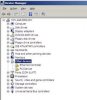
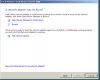
I attached a photo of the device manager screen that I have and the error window that comes up.

I also started completely from scratch and same problem.

There is NO problem for my xp and win 2003 VMs just this 2008 install killing me ;)

Parallels ROCKS and works like nothing I could have dreamt of.

Thanks for your help.
 

Attachments

  • Picture 1.jpg
    Picture 1.jpg
    12.4 KB · Views: 9
  • pastedGraphic.jpg
    pastedGraphic.jpg
    11.4 KB · Views: 8
I Just read the knowledge-base article you provided (thanks)

But I have a STUPID question - how do I get the server to 'find' this file as on the 'floppy' drive?

Bear with me - while I have been an DBA for more than 20 years this is my first MAC.. Thanks for everything.
 
Ok I figured out how to 'load an image' for the floppy.

Unfortunately still troubles in paradise

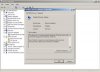
attached is the latest problem - we now can see a network adapter but with an exclamation mark and stating it can't load the drivers for it.

THanks again.
 

Attachments

  • pastedGraphic2.jpg
    pastedGraphic2.jpg
    16.2 KB · Views: 10
Hm.
On the picture there is a "Network Adapters"->"Parallels Ethernet Adapter" device with exclamation mark.
And "Other Devices"->"Ethernet Controller".

Please try to remove the "Parallels Ethernet Adapter" by right-click on it in the Device Manager and selecting "Uninstall".

Then Right-click on the "Ethernet Controller" under "Other Devices" and select "Update Driver". Select "Don't connect to the Microsoft", in the next dialog "Install from the specific location", and point to the driver on floppy.

This should help.
 
Elric,

This took care of the network problem - I was trying to 'add' a NEW network adapter with the download from the knowledgebase article. Once I removed that and updated the ethernet that we started off with that took care of it. I still have that PCI with the problem but I dont think it will stop the install from completing -when you have a moment if you could let me know if it is a problem or how to resolve that pci it would be GREAT,

I am sure I sound like a broken record but my installation, setup and support experience with Parallels has been great. Oh by the way anyone who never bothers to break the cover of a instruction manual should on this one - I do believe it is the most I have touched a physical user manual in ages. It allowed me to get almost all the answers I required

Thank you Elric for everything.
 
I still have that PCI with the problem but I dont think it will stop the install from completing -when you have a moment if you could let me know if it is a problem or how to resolve that pci it would be GREAT,

It's a special device that internally used by Parallels Tools. This issue will be resolved after installing the Parallels Tools. So, it seems to be all ok with installation of Windows

Thank you Elric for everything
Glad to be helpful -)
 
Last edited:
Elric,

You were 100% on everything!!! When the install completed I installed the parallel tools and TADA - device manager is issue FREE :)

Windows 2008 - install was the only platform i have experienced any issues to resolve for me:

IMAC 3 Ghz processor - 4 Gig ram - 1 TB Hard drive

I had to set the ram to 4 gig and the Hard drive over 60 gig to get the windows 2008 to install (demands min. 4 gig ram during install) - I felt that I would 'not' want to allocate 'all' my ram to a virtual machine so when I finally got this install up and running I went back to configure and brought it down to 2gig - so far so good.

Just though it might be useful information
 
Back
Top