Internationalisation of SmartGuard snapshot names

MarinusB

Junior Member
Parallels in general is internationalised properly: in particular, it formats dates and times according to the 'locale' of the computer it is running on. The exception is SmartGuard: the current standard name for snapshots contains a timestamp in the format MM/DD/YY H:MI AM/PM, which is the format normally used in the United States.

However, IMHO the snapshot names should follow the local convention--i.e. as used in the dates below the snapshots in the list of Manage Snapshots.

For most of Europe, for example, this would be DD-MM-YYYY HH24:MI. In short, you obviously know about internationalisation, so you might as wel be consistent about it.
 
Last edited:
Hi MarinusB,

Thank you for the suggestion!

We use macOS system locale settings to provide timestamps for the SmartGuard snapshots.
If it doesn't work for you, can you please post Technical Data Report ID here and a screenshot of Language & Region page. We will investigate.
 
Hi Alev,
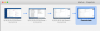
The screen clipping from the Parallels snapshot map dialog shows what I mean.
In the current locale used by my OSX instance, timestamps are formatted as follows: <day>-<month>-<year> <hour in 24 hour clock>:<minutes>; most countries in Western Europe use this format, with minor variations (e.g. dots or slashes instead of hyphens in the date). See the dates below the shnapshots.
However, the name of the snapshot is still in the US format: <month>/<day>/<year> <hour in 12 hour clock>:<minutes> <AM | PM>. Especially the reversal of month and day (and less so, the use of AM/PM) is unfamiliar to Europeans...
It would be nice to have a snapshot name consistent with the locale. In other words: use the locale both to generate the snapshot name and the date below it in the list in the dialog.
 

Attachments

  • Screenshot 2019-04-03 at 08.21.21.png
    Screenshot 2019-04-03 at 08.21.21.png
    150.2 KB · Views: 4
I see. Looks like a bug. We will take a closer look.

Thank you very much for bringing our attention to this!
 
Back
Top