1. Mac OS Version - 10.5.7
2. Parallels Build #3844
3. What kind of computer - iMac (1 year old Intel)
4. Total Physical RAM - 4GB
5. Hard Drives - 1
6. If you are using a BootCamp configuration or not - Not
7. Did you upgrade from a BETA - Upgraded from 3.0 to 4.0 build 4.0.3522 on 22 December 2008
8. With what Build did the problem start - With this update - build 4.0.3844
9. If Parallels Tools are installed - Yes
10. Anything you have tried to get things working - Everything appears to work
11. Anything specific about your set-up you think we should know - Nothing special.
12. If you are crashing, upload some crash logs - Not crashing
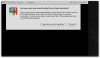
13. If you are getting an error message type it in and then attach a screenshot.
"One or more kernel components loaded on your Mac are from another version of Parallels desktop. If you start the virtual machine now, it may work incorrectly. To solve this problem restart your Mac. If the problem persists, reinstall Parallels desktop."
If I do a reinstall of Parallels 4.0 build 4.0.3522, and then I reinstall update build 4.0.3844 to attempt to eliminate this error message (which I get when I start my XP virtual machine), will I loose my existing XP drive?
Should I uninstall Parallels first?
I don't use this very often so I can't say I have done any testing to be able to tell if anything is not working. I know I can connect to the internet using Explorer and programs like Excel and MS Project appear to work OK. SimCity 4 appears to work OK.
2. Parallels Build #3844
3. What kind of computer - iMac (1 year old Intel)
4. Total Physical RAM - 4GB
5. Hard Drives - 1
6. If you are using a BootCamp configuration or not - Not
7. Did you upgrade from a BETA - Upgraded from 3.0 to 4.0 build 4.0.3522 on 22 December 2008
8. With what Build did the problem start - With this update - build 4.0.3844
9. If Parallels Tools are installed - Yes
10. Anything you have tried to get things working - Everything appears to work
11. Anything specific about your set-up you think we should know - Nothing special.
12. If you are crashing, upload some crash logs - Not crashing
13. If you are getting an error message type it in and then attach a screenshot.
"One or more kernel components loaded on your Mac are from another version of Parallels desktop. If you start the virtual machine now, it may work incorrectly. To solve this problem restart your Mac. If the problem persists, reinstall Parallels desktop."
If I do a reinstall of Parallels 4.0 build 4.0.3522, and then I reinstall update build 4.0.3844 to attempt to eliminate this error message (which I get when I start my XP virtual machine), will I loose my existing XP drive?
Should I uninstall Parallels first?
I don't use this very often so I can't say I have done any testing to be able to tell if anything is not working. I know I can connect to the internet using Explorer and programs like Excel and MS Project appear to work OK. SimCity 4 appears to work OK.