
The thread was moved from "User Solutions and Workarounds" by Xenos
Hi,
Yesterday I encountered the very serious Leopard-Move-Files Bug.
Long Story
Yesterday I decided to run Parallels Compressor in order to shrink my VM. It worked, the file size was reduced to 17GB. Well, in order to run Parallels compressor I moved my VM Folder to my external HDD, I removed all snapshots, compressed it and after that I run Parallels to see if it still works. It worked. I shut down the VM and moved the VM Folder back to my Internal HDD. At the end of the moving process I got an error that the moving failed because the file is still in use. I noticed that I shut down the VM but Parallels was still running.
I shut down Parallels and closed the error dialog.
BAM!
My VM Folder was gone. It was neither on my external HDD nor on my internal HDD. OS X decided to delete it although the moving process failed. §$%&§*#!!!!!
The Recovery
So, I run a recovery Tool on my External HDD to recover my VM Folder. It discovered 4 files in my *.hdd package:
winxp.hdd.0.{8659f5b2-0a16-49d8-910b-914fe82508b8}.hds
winxp.hdd.0.{5fbaabe3-6958-40ff-92a7-860e329aab41}.hds
winxp.hdd.0.{6abe3189-e3ee-4fd0-8f83-01c9d5bae044}.hds
DiskDescriptor.xml
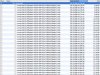
Now I'm faceing the problem that I can recover those files, BUT, I can recover at least 20 versions of them with different date and diffrerent size. (see attachment)
I tried to recover the files with the eldest dates, Parallels opened it but could not boot.
Can somebody explain me what *.hds files are and the difference of the 3 *.hds files?
Does Parallels need all 3 *.hds files?
regards
Arret
Hi,
Yesterday I encountered the very serious Leopard-Move-Files Bug.
Long Story
Yesterday I decided to run Parallels Compressor in order to shrink my VM. It worked, the file size was reduced to 17GB. Well, in order to run Parallels compressor I moved my VM Folder to my external HDD, I removed all snapshots, compressed it and after that I run Parallels to see if it still works. It worked. I shut down the VM and moved the VM Folder back to my Internal HDD. At the end of the moving process I got an error that the moving failed because the file is still in use. I noticed that I shut down the VM but Parallels was still running.
I shut down Parallels and closed the error dialog.
BAM!
My VM Folder was gone. It was neither on my external HDD nor on my internal HDD. OS X decided to delete it although the moving process failed. §$%&§*#!!!!!
The Recovery
So, I run a recovery Tool on my External HDD to recover my VM Folder. It discovered 4 files in my *.hdd package:
winxp.hdd.0.{8659f5b2-0a16-49d8-910b-914fe82508b8}.hds
winxp.hdd.0.{5fbaabe3-6958-40ff-92a7-860e329aab41}.hds
winxp.hdd.0.{6abe3189-e3ee-4fd0-8f83-01c9d5bae044}.hds
DiskDescriptor.xml
Now I'm faceing the problem that I can recover those files, BUT, I can recover at least 20 versions of them with different date and diffrerent size. (see attachment)
I tried to recover the files with the eldest dates, Parallels opened it but could not boot.
Can somebody explain me what *.hds files are and the difference of the 3 *.hds files?
Does Parallels need all 3 *.hds files?
regards
Arret
Attachments
Last edited by a moderator: