G'day all,
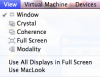
I turned on Mac Look in the Configure options for my virtual machine, but don't like it, and turned it off.
But it won't go away... Am I stuck with it forever, or is this a bug.
I have tried :
turning it on and off again.
Turning it off, quitting and restarting parallels, checking it is still off and then starting the vm
changing the desktop settings from within windows.
I occasionally get an error message when changing the windows display properties (the Windows and buttons Appearance option from Windows Classic style to Windows XP style)

'Applying Visual Styles Error - The visual styles could not be applied. Access is denied' (In case the picture didn't work)
cheers
Ben
I turned on Mac Look in the Configure options for my virtual machine, but don't like it, and turned it off.
But it won't go away... Am I stuck with it forever, or is this a bug.
I have tried :
turning it on and off again.
Turning it off, quitting and restarting parallels, checking it is still off and then starting the vm
changing the desktop settings from within windows.
I occasionally get an error message when changing the windows display properties (the Windows and buttons Appearance option from Windows Classic style to Windows XP style)
'Applying Visual Styles Error - The visual styles could not be applied. Access is denied' (In case the picture didn't work)
cheers
Ben