After successfully using Parallels with Windows 11 on a Mac M1 yesterday, I attempted to wake it up today from being suspended, it would get to the Windows boot part then go black and stay there.
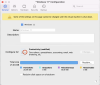
After messing around with it for quite a while, I set the VM to Stop in the Control Center and tried the configuration in the attached screen shot.
Once set, I was able to Suspend and restart, and it came up!
It may have had to dow with a Windows update on my VM because as soon as it got past the startup window, it started downloading the update. I don't know for sure its related but I would theorize there was something about the Suspended state that doesn't like Updates.
Hope this helps some of you other "Black Screen" victims.
After messing around with it for quite a while, I set the VM to Stop in the Control Center and tried the configuration in the attached screen shot.
Once set, I was able to Suspend and restart, and it came up!
It may have had to dow with a Windows update on my VM because as soon as it got past the startup window, it started downloading the update. I don't know for sure its related but I would theorize there was something about the Suspended state that doesn't like Updates.
Hope this helps some of you other "Black Screen" victims.