Hi
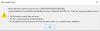
I purchased the parallel desktop software today with the pure intention of using Excel Window. After I installed Excel Window, I tried to open the file and was shown this. Please advise on this. The pop-up window was attached.
"Microsoft Excel cannot access the file \\Mac\Home\Dropbox\My Mac(Kings-MacBook-Pro.local)\Downloads\Excel-Course-Download-Kit\ABC.xisx"
It'd be much appreciated.
Best,
Brian
I purchased the parallel desktop software today with the pure intention of using Excel Window. After I installed Excel Window, I tried to open the file and was shown this. Please advise on this. The pop-up window was attached.
"Microsoft Excel cannot access the file \\Mac\Home\Dropbox\My Mac(Kings-MacBook-Pro.local)\Downloads\Excel-Course-Download-Kit\ABC.xisx"
It'd be much appreciated.
Best,
Brian