Hello all
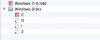
I'm quite new to mac so not entirely sure what I'm doing! Here is the contents of my windows 7.pvm which contains a folder called Windows Disks. I want to have the D alias here:

Mounted so I can access the D drive from /Volumes/D/. The D:\ drive is a mapped network drive on my windows vm to a folder in my home directory on the mac file system. I know it sounds weird but when I load a FlashDevelop project from finder, FlashDevelop struggles to deal with network locations like \\psf\d. But if I can somehow mount that D alias (which I'm guessing is the D:\ network location in windows) I can load projects from finder, via /Volumes/D, and have FlashDevelop deal with paths like D:\.
I know this can be done as sometimes if I launch a file from FlashDevelop, somehow parallels will mount this drive and I can access files through /Volumes/D, although this can sometimes disappear and only happens if I build a project. So I would like to know how to do it manually if someone can help me please.
Thanks!
I'm quite new to mac so not entirely sure what I'm doing! Here is the contents of my windows 7.pvm which contains a folder called Windows Disks. I want to have the D alias here:
Mounted so I can access the D drive from /Volumes/D/. The D:\ drive is a mapped network drive on my windows vm to a folder in my home directory on the mac file system. I know it sounds weird but when I load a FlashDevelop project from finder, FlashDevelop struggles to deal with network locations like \\psf\d. But if I can somehow mount that D alias (which I'm guessing is the D:\ network location in windows) I can load projects from finder, via /Volumes/D, and have FlashDevelop deal with paths like D:\.
I know this can be done as sometimes if I launch a file from FlashDevelop, somehow parallels will mount this drive and I can access files through /Volumes/D, although this can sometimes disappear and only happens if I build a project. So I would like to know how to do it manually if someone can help me please.
Thanks!